


Who This Guide Is For (And Why ‘Shared Responsibility’ Matters Now)
If you are responsible for a website or online service, you will have seen the phrase “shared responsibility” in hosting or cloud documentation. It often appears in security pages, uptime guarantees and PCI answers, but is rarely explained in a way that helps you run your business more safely.
This guide is for people who:
- Own or manage websites, web apps or online shops, such as WordPress or WooCommerce
- Make decisions about hosting, but are not full time infrastructure engineers
- Need to understand what the hosting provider looks after and what still sits with your team
Typical situations where responsibility gets blurred
Confusion tends to appear at the worst possible moments. Common examples:
- A WooCommerce store is hacked and customer data is at risk. The site owner believes the host “handles security”. The host says the issue is a vulnerable plugin.
- A marketing campaign drives heavy traffic and the site slows to a crawl. The agency blames the host, the host points to inefficient code and huge unoptimised images.
- Card payments start failing. The payment gateway blames the merchant’s site, the host says the server is healthy, and everyone is unsure who owns the incident.
- An audit or PCI questionnaire arrives and someone realises nobody knows who is actually logging what, where backups are stored, or how long data is retained.
None of these situations are unusual. They are not about technical “gotchas” as much as unclear boundaries.
What you will be able to map by the end
By the end of this guide you should be able to:
- Explain in simple terms what “shared responsibility” means for your current hosting
- Describe who is responsible for security, uptime, backups and compliance at each layer
- Identify gaps where nobody has clearly taken ownership
- Create a simple shared responsibility matrix you can use with your host and internal teams
- Ask focused questions when choosing between shared hosting, VPS, virtual dedicated servers or managed platforms
Throughout, we will focus on practical decisions rather than any particular product. If you would like a deeper dive into concrete scenarios, see Understanding Hosting Responsibility: What Your Provider Does and Does Not Cover.
Plain‑English Definition: What Shared Responsibility Means in Hosting
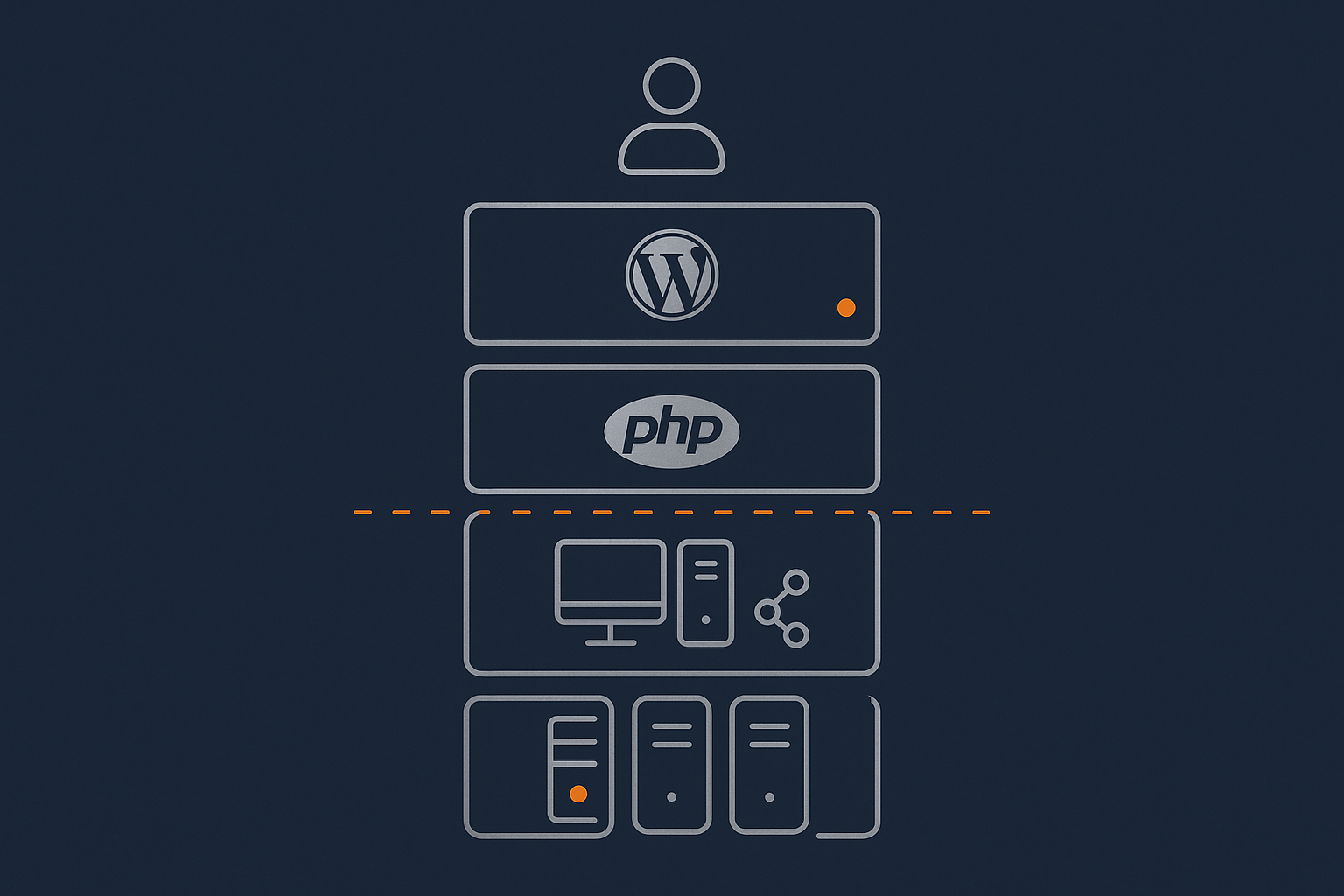
The basic idea: the host runs the platform, you run the site
At a high level:
- Your hosting provider runs and protects the infrastructure and hosting platform.
- You run and protect your application, data and how people use it.
The “stack” usually looks like this, from bottom to top:
- Physical data centre (building, power, cooling, physical security)
- Network (internet connections, routers, switches)
- Server hardware and hypervisors
- Operating system (Linux, Windows) and core services
- Runtime/platform (PHP, databases, web server like Nginx or Apache)
- Application (WordPress, custom app, plugins, themes)
- Content and data (pages, products, user data, orders)
- Users and processes (staff accounts, customers, admins)
Shared responsibility is simply agreeing which layers the provider owns, which you own, and which are genuinely shared.
How this differs on shared hosting, VPS/VDS and managed platforms
The hosting model shifts the split:
- Shared hosting / cPanel
The provider manages the data centre, network, hardware and most of the platform. You manage your application (for example WordPress) and content. You have limited control over deeper layers. - VPS or virtual dedicated servers
You gain root or administrator access. The provider looks after the physical layer and virtualisation. You are responsible for the OS and above, unless you add a managed service. - Managed platforms (for example Managed WordPress hosting or a managed WooCommerce cluster)
The provider takes on more of the platform and sometimes parts of the application stack, such as updates and performance tuning. You still own your content, business logic and how your site behaves.
The more control you have, the more responsibility you take on. The more the host manages for you, the more you need to understand their guarantees and limits.
Why contracts, not assumptions, define the split
In practice, shared responsibility is not defined by what feels reasonable. It is defined by:
- Your hosting contract and terms of service
- The service level agreement (SLA) and any uptime or support commitments
- Security and compliance documentation (for example PCI or data protection statements)
Informal comments like “we keep everything secure” mean little compared with written scope. If you are unsure whether something is covered, assume it is your responsibility until you can confirm in writing that it is shared or fully handled by the provider.
Security Responsibilities: Who Protects What, Where And How
Server and network level security: usually the provider’s job
Most reputable hosts focus heavily on securing the lower layers, as this is where an issue could affect many customers at once.
Firewalls, WAF, bad bot filtering and intrusion prevention
Your provider will typically handle:
- Network firewalls that limit which ports and services are accessible
- Host based firewalls on servers
- Web Application Firewalls (WAF) to block common web attacks
- Bad bot filtering and rate limiting to reduce abusive requests
- Intrusion detection / prevention on the platform
On G7Cloud, WAF and traffic controls are combined with the G7 Acceleration Network, which can filter abusive traffic before it reaches your application. This does not remove the need for secure code, but it lowers the volume of hostile requests your site has to deal with.
OS patching, PHP versions and platform hardening
Your provider is usually responsible for:
- Keeping the server operating system patched and supported
- Maintaining supported versions of PHP and other runtimes
- Hardening platform configuration (SSH access, secure defaults, isolation between customers)
On unmanaged VPS or dedicated servers this may be your job instead, which is why many organisations opt for managed services once they reach a certain scale. The operational effort of patching and hardening consistently is easy to underestimate.
Application and content level security: usually your job
The higher layers are where your choices matter most. A secure platform cannot fully protect a site with weak passwords or vulnerable plugins.
WordPress, plugins, themes and custom code
You are usually responsible for:
- Choosing themes and plugins wisely and removing those you do not use
- Keeping WordPress core, plugins and themes up to date
- Ensuring custom code is maintained and reviewed
- Disabling or restricting features you do not need (for example XML‑RPC)
Most real world compromises happen at this layer. Security plugins and a strong platform help, but they cannot fix vulnerable or abandoned extensions on their own.
User accounts, passwords, roles and API keys
Account and access management is squarely in your domain:
- Using strong, unique passwords and multi‑factor authentication where available
- Removing old staff accounts and limiting administrator access
- Protecting API keys for payment gateways and third party services
- Defining sensible roles and permissions inside your CMS or application
A well secured server cannot stop an attacker logging in through a shared admin password.
Gray areas on managed hosting: what a good provider will take on
Managed updates, staging, malware response and advice
On Managed WordPress hosting or similar managed platforms, the host may:
- Perform or at least schedule core and plugin updates
- Provide staging environments so you can test changes safely
- Scan for malware and provide clean‑up assistance
- Offer guidance on secure plugin choices and configuration
This shifts operational load and risk away from your internal team, which is valuable if you do not have specialist capacity in house. It does not remove your responsibility to make informed choices about what you install and how your site behaves.
What still stays firmly in your court
Even with strong web hosting security features, the following are almost always your responsibility:
- Business logic, pricing rules and custom workflows
- Staff training and internal security policies
- How you collect, store and process personal data
- Responding to security incidents that involve your wider systems, such as email or CRM
Managed services can help you reduce technical risks, but organisational security remains yours.
Common security misunderstandings and gaps
“We have a security plugin, so the host is covered”
Security plugins are useful, but they do not shift responsibility. They are part of your application stack, not the provider’s platform. If a plugin misbehaves, is abandoned or is misconfigured, you still own that risk.
Confusing backups with security, or WAF with secure code
Two frequent points of confusion:
- Backups help you recover from an incident. They do not prevent compromise.
- WAFs block known attack patterns. They do not make insecure code safe or compensate for weak authentication.
Security is layers of responsibility. Shared responsibility is about understanding which layers are covered by your host and which depend on your decisions.
Uptime and Reliability: Who Owns Which Parts Of ‘Staying Online’
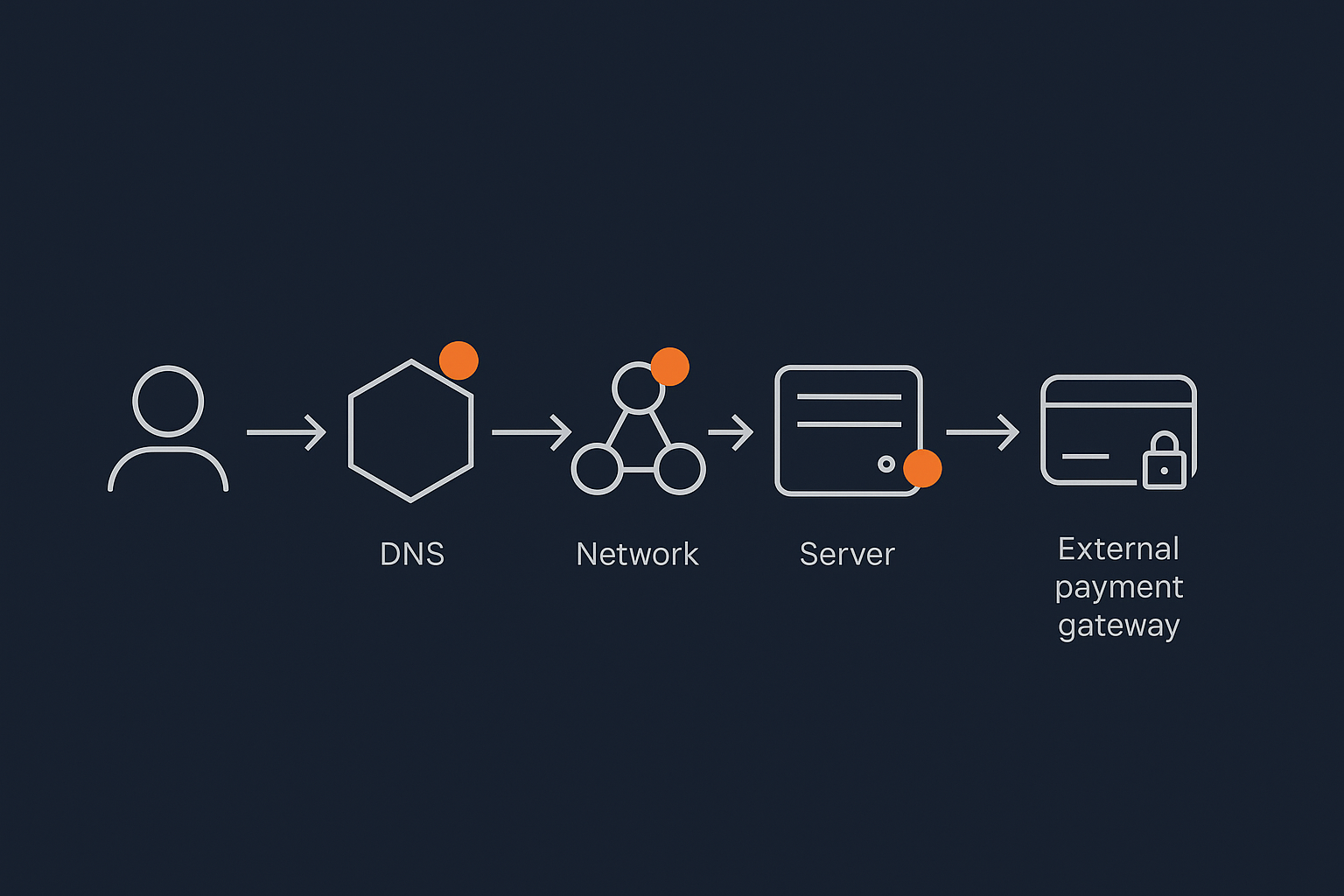
The stack from data centre to checkout: where failures can happen
For a customer to complete a purchase, a lot must work:
- The data centre must have power and cooling
- Network links must be available and uncongested
- Servers and storage must be healthy
- The operating system and web server must be running
- Your application must load without errors
- Third party services such as payment gateways and tracking scripts must respond
An outage can occur at any of these layers. Responsibility is therefore also layered. For more incident‑level scenarios, see Who Owns the Outage? Shared Responsibility Between Your Host, Platform and Payment Gateway.
What your hosting provider is usually responsible for
Power, cooling, network and hardware
At the bottom layers, your provider typically owns:
- Redundant power feeds, UPS and generators
- Cooling systems in the data centre
- Physical security and access controls
- Redundant network connections and core routing
- Server hardware and storage devices
If an outage is caused by a failed power feed that is not correctly covered by failover, this is squarely within the provider’s scope.
Hypervisor, storage, basic monitoring and incident response
On virtualised platforms your provider will also handle:
- Hypervisors that run virtual servers
- Shared storage platforms and replication
- Baseline monitoring of resource usage and health
- Initial incident response when something fails at platform level
This is where SLAs and uptime guarantees typically apply. They focus on availability of the platform, not necessarily the availability of your specific application features.
What you (and your developers) are responsible for
Themes, plugins, code changes and configuration
Within your application, you are responsible for:
- Deploying code and configuration changes safely
- Using staging environments to test updates
- Rolling back changes that introduce errors
- Designing your application to cope with traffic spikes where possible
If a new plugin update causes fatal errors, this typically counts as application downtime, not platform downtime. The server can be “up” while your site cannot serve customers.
Content, images, third party scripts and experiments
Content choices also affect perceived uptime:
- Very large images and heavy pages can make a site feel “down” under load
- Third party scripts such as chat widgets or tag managers can block page load
- Client‑side experiments can introduce bugs that prevent checkout
Services like the G7 Acceleration Network can lower the impact of image weight by caching content and converting images to AVIF or WebP on the fly, often reducing image size by more than 60 percent. This does not fully remove the need to design pages carefully, but it buys you headroom.
Who owns the outage when everything is ‘working’ but customers cannot buy
A common grey area is when:
- The server is running
- Your home page loads
- But checkout or login fails due to a plugin, external API or JavaScript error
From a customer’s perspective the site is “down”. From a hosting SLA perspective the platform might be 100 percent up for the month. Typically:
- The host owns issues within the hosting stack
- You and your developers own issues within your application and integrations
- Third party providers such as payment gateways own their side of the process
This is why good observability and realistic test flows are important. You need to be able to identify where a failure occurred before you can expect the right party to fix it.
How uptime guarantees and SLAs really fit into shared responsibility
Uptime guarantees are useful, but narrow. They typically:
- Cover network and power availability at the data centre
- Sometimes cover hypervisor and shared storage
- Rarely cover your application code or third party services
Before relying on an SLA, understand:
- Exactly which layers are measured
- What counts as downtime and how it is logged
- What compensation is offered and whether it is material to your business
If you want more on how SLAs map to real risk, see What Uptime Guarantees Really Mean in Real World Hosting.
Backups, Redundancy and Disaster Recovery: Responsibilities Before And After Things Break
Backups vs redundancy: what each one covers and who configures them
Backups and redundancy solve different problems:
- Backups are point‑in‑time copies of data that you can restore after deletion, corruption or compromise.
- Redundancy means having multiple copies of systems running so that if one fails, others take over.
Both involve shared responsibility. Your provider usually offers backup tooling and platform‑level redundancy. You decide how you use them and what recovery objectives you need. A detailed discussion is available in Backups vs Redundancy: What Actually Protects Your Website.
Typical provider responsibilities for backups and restore tooling
Your host will often:
- Provide automated backups of your hosting account or server
- Store backups on separate storage with some level of redundancy
- Offer restore tools or support to help you roll back data
In more advanced setups, they may also:
- Replicate data between regions or data centres
- Maintain snapshot schedules at the virtual machine or volume level
Your responsibilities: choosing retention, testing restores, recovery plans
You are usually responsible for:
- Choosing how long backups are kept and how often they run
- Deciding whether to maintain your own off‑site backups too
- Testing that restores work and meet your needs
- Documenting who does what during an incident
If you never test a restore, you will not know whether it meets your expectations for recovery time or data freshness.
Designing realistic RPO and RTO with your provider
Two key terms:
- RPO (Recovery Point Objective)
How much data you can afford to lose, measured in time. For example, “we can lose up to 4 hours of orders”. - RTO (Recovery Time Objective)
How long you can afford to be offline while recovering, for example “we can be down for up to 1 hour”.
Designing realistic RPO and RTO is a shared exercise:
- You define business tolerance for downtime and data loss
- Your host explains what is technically and financially realistic
- Together you choose an architecture and backup strategy that fits
If you are uncertain about the terminology, the ISO 22301 standard on business continuity provides formal definitions, although it is more detailed than most teams need.
Compliance and PCI: How Responsibility Is Shared Around Regulators And Card Schemes
The different layers of responsibility in PCI‑conscious hosting
If you take card payments, Payment Card Industry Data Security Standard (PCI DSS) requirements will apply to some degree. Hosting providers can help, but cannot make you “PCI compliant” on their own. For a focused guide, see Hosting for Card Payments: What ‘PCI Conscious’ Really Means and How Responsibilities Are Shared.
Data centre and infrastructure responsibilities
In a PCI conscious hosting setup, the provider is usually responsible for:
- Physical security controls in the data centre
- Segmentation of cardholder data environments
- Network security at the perimeter and between zones
- Baseline logging and monitoring of infrastructure components
Application, payment gateway and organisational controls
You, as the merchant or service provider, are typically responsible for:
- How card data flows through your application or whether you fully outsource it to a gateway
- Choosing and configuring your payment gateway correctly
- Staff policies, training and acceptable use
- Procedures for handling potential data breaches
The more your system touches card data directly, the more PCI scope and responsibility you carry.
What a PCI‑conscious host actually covers vs what is still on you
A PCI conscious host will usually:
- Provide an environment designed to meet relevant PCI infrastructure requirements
- Offer documentation and assistance for PCI questionnaires
- Maintain controls they directly operate, such as firewalls and physical security
You still need to:
- Complete your own PCI self‑assessment or audits
- Document policies, access controls and incident response
- Control how your staff access systems and handle cardholder data
Beyond PCI: privacy, logging and data retention responsibilities
Regulations such as GDPR, UK GDPR and other privacy laws add further layers:
- Your provider can give you tools to manage logs, backups and locations of data.
- You decide what data you collect, how long you keep it and who you share it with.
Logging is a shared responsibility too. The host may log infrastructure events, but you often need application‑level logging to meet audit or security requirements.
Common compliance traps: “we thought the host handled that”
Patterns that cause trouble during audits:
- Assuming the host keeps logs forever when retention is actually 7 or 30 days
- Relying on platform backups without checking whether they align with data retention policies
- Believing that “PCI hosting” removes the need for staff training or policies
Compliance is always shared. A good provider reduces your technical burden, but cannot own your regulatory obligations.
How Hosting Model Changes The Responsibility Split
Shared hosting and cPanel: convenience but limited scope
On shared hosting:
- Your host owns almost everything below your application, from data centre to PHP binary.
- You usually have limited ability to change deep security or performance settings.
- You are fully responsible for application updates, security choices and content.
This model is simple and low cost, but you have less flexibility to tailor controls if you have specific security or compliance needs.
VPS and virtual dedicated servers: more control, more to own
With a VPS or virtual dedicated server:
- You gain root access and can configure the OS, firewall and services.
- You decide when to patch the OS, upgrade PHP and tune performance.
- You may need to set up your own monitoring, backups and automation.
This suits teams with technical expertise and a need for fine control. It also increases operational load. Managed VDS services can sit in the middle, leaving you control over applications while the provider handles most platform operations.
Managed WordPress / WooCommerce and enterprise setups: operational load shifts to your host
On fully managed platforms, such as Managed WordPress hosting or specialised WooCommerce hosting:
- The provider often manages the OS, PHP, database and WordPress core.
- They may automate updates, provide staging and assist with performance tuning.
- They typically take on more responsibility for uptime at the application platform level.
This reduces risk from routine operations and suits teams who want to focus on content and features rather than systems administration. It still leaves business logic, content and compliance decisions with you.
Mapping your responsibilities when you move between models
When you migrate between hosting models, review:
- Which tasks you were previously relying on your host for
- Which tasks you are now expected to manage (or vice versa)
- Who inside your organisation will own those tasks
Articles like Managed vs Unmanaged Servers: Who Does What, And What Can Still Break? can help you understand the impact of these shifts in more depth.
Creating A Simple Shared Responsibility Matrix For Your Own Setup

How to list the main areas: infrastructure, platform, application, data and users
A shared responsibility matrix is a simple table listing:
- Rows: responsibility areas, such as infrastructure, platform, application, data, users.
- Columns: parties, usually “Host” and “You”, sometimes also “Third Party”.
Start by listing areas such as:
- Data centre and network
- Server OS and runtime (PHP, database)
- Application platform (WordPress, plugins, theme)
- Security monitoring and incident response
- Backups and disaster recovery
- Compliance, logging and data retention
- User management and staff training
Assigning ‘Host’, ‘You’ or ‘Shared’ for each area
For each item, mark:
- Host where the provider has primary responsibility
- You where your organisation has primary responsibility
- Shared where collaboration is required
Be specific where you can. For example:
- “Backups: host provides nightly backups, customer defines retention and tests restores.”
- “PCI logging: host logs infrastructure; customer logs application events and access.”
Checking your contract and SLA against the matrix
Once you have a draft matrix:
- Compare each row against your contract, SLA and security pages.
- Highlight any items where the documentation is silent or vague.
- Ask your provider to confirm or correct those entries in writing.
Adjust your matrix until it reflects what is actually agreed, not just what you would like to be true.
Using the matrix in real conversations with providers and internal teams
A responsibility matrix is most useful when you:
- Share it with your developers, marketing team and management.
- Use it when planning new features, campaigns or migrations.
- Review it annually or when your hosting model changes.
It gives everyone a shared mental model and reduces finger‑pointing when incidents occur.
Questions To Ask Your Hosting Provider About Shared Responsibility
Security questions
- Which layers of the stack do you secure by default, and how?
- What intrusion detection and WAF protections do you operate, and what is my role in tuning them?
- Who is responsible for OS, PHP and database patching in my plan?
- Do you offer managed updates for platforms like WordPress, and what exactly do you update?
- In the event of malware on my site, what support do you provide and what do you expect from me?
Uptime, monitoring and incident response questions
- What does your uptime guarantee actually measure, and at what layers?
- Which types of incidents are covered by your SLA, and which are application‑level?
- What monitoring do you run by default, and what should I monitor myself?
- How do you communicate major incidents, and how can my team get live updates?
- Can you help simulate failover or recovery so we both understand the process?
Backups, DR and compliance questions
- How often are backups taken, where are they stored and for how long?
- What is the typical RPO and RTO your platform can support, and what options exist to improve them?
- Who is responsible for testing restores and verifying backup integrity?
- What evidence and documentation can you provide for PCI, GDPR or other compliance needs?
- What logging is available at infrastructure level, and what do I need to provide at application level?
Next Steps: Choosing Hosting That Matches Your Risk And Responsibility Appetite
When it makes sense to stay on shared hosting with clear boundaries
Shared hosting is often sufficient when:
- Your site is relatively simple and not business critical
- You do not handle card data directly
- You are comfortable managing application updates and basic security hygiene
In these cases, the key is to document boundaries clearly and ensure your team understands what the host will and will not cover.
When to move to managed WordPress, WooCommerce or a managed VDS
It may be worth moving to a managed platform or managed VDS when:
- Downtime, slow performance or security incidents would cause serious reputational or financial damage
- Your internal team is stretched thin and struggles to keep up with patching and monitoring
- You need stronger guarantees around backups, DR or PCI conscious infrastructure
In these situations, shifting more operational responsibility to your hosting provider can be a pragmatic way to reduce risk, provided you remain clear on what still belongs to you.
Where to go next for deeper guides on uptime, PCI and resilience
If you would like to explore specific areas further:
- What Uptime Guarantees Really Mean in Real World Hosting for understanding SLAs
- Hosting for Card Payments: What ‘PCI Conscious’ Really Means and How Responsibilities Are Shared for card handling and PCI scope
- Backups vs Redundancy: What Actually Protects Your Website for resilience planning
If you would like help mapping shared responsibility for your own setup, or want to reduce operational risk through managed hosting or a virtual dedicated server, you are welcome to talk to G7Cloud about which architecture fits your needs and appetite for responsibility.