Understanding Hosting Responsibility: What Your Provider Does and Does Not Cover
Why Hosting Responsibility Matters More Than You Think
The hidden assumptions most teams make about hosting
Hosting conversations often start with price, storage and bandwidth. The quiet assumption in the background is “if anything goes wrong, the host will fix it”.
In reality, every hosting setup is a shared responsibility arrangement. The provider looks after some parts of the stack, you look after others. Problems arise when neither side has a clear picture of where that line is.
Typical assumptions that cause trouble later include:
- Believing that “managed” means the host will fix any problem with your site, no matter the cause
- Assuming backups include everything, from server configuration to your last customer order
- Expecting uptime guarantees to cover any kind of outage, including bugs in your code or plugin conflicts
- Thinking security is “taken care of” because the data centre is secure and there is a firewall
These are understandable assumptions, especially if hosting is only one of many things you look after. But they do not match how most providers work, and that gap matters.
Real world consequences when responsibility is unclear
When responsibilities are fuzzy, small issues can turn into expensive incidents:
- A WooCommerce store goes down after a plugin update. The business expects the host to roll back and repair the store. The host sees it as an application issue and offers best effort advice only.
- A database is deleted by mistake. The provider has infrastructure backups, but the restore point is too old to recover the latest orders. No explicit agreement existed about database backup frequency.
- A malware infection appears. The company assumes the host will clean the site. The host’s role is limited to protecting the platform and providing malware scans, not fixing compromised code.
None of these mean anybody is negligent. They usually mean people were working from different mental models about who does what.
How this guide is structured
This guide aims to make those mental models explicit. We will:
- Start with a simple view of the hosting stack from physical power to your content
- Explain what providers typically cover, and what usually remains your responsibility
- Show how responsibilities shift between shared hosting, managed WordPress and virtual dedicated servers
- Highlight common grey areas such as backups versus redundancy and security incidents
- Offer practical steps to turn this understanding into clear agreements and internal processes
The goal is not to make you a full time infrastructure engineer. It is to give you enough clarity to ask good questions, choose the right level of management and avoid surprises.
The Basic Layers: From Power and Network to Your Website
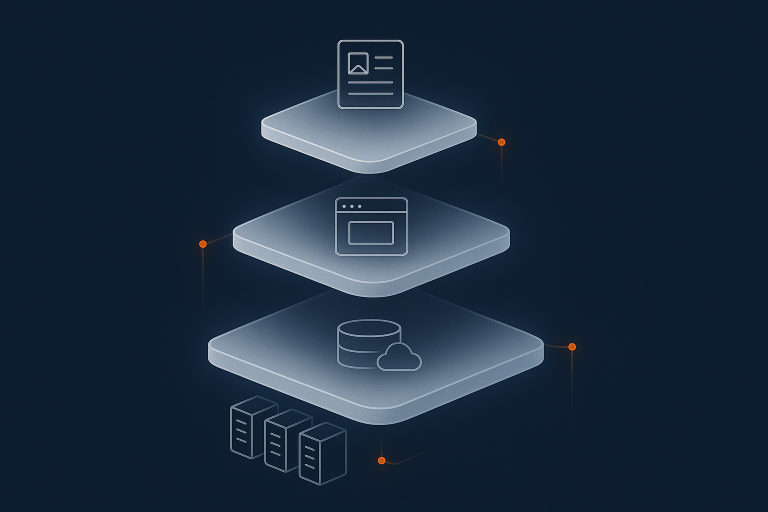
A simple stack: data centre, server, software, site, content

A useful way to think about hosting is as a stack of layers. From bottom to top:
- Data centre: buildings, power feeds, generators, cooling and physical security.
- Network: switches, routers and connections to the internet.
- Server: physical or virtual machines, storage, CPU and RAM.
- Platform software: operating system, web server, PHP, database, control panels.
- Application / site: WordPress, WooCommerce, custom applications, themes, plugins, code.
- Content and data: pages, images, products, customer data, orders, form submissions.
Every hosting product is, in essence, a particular way of dividing responsibility for these layers between you and the provider.
What almost every hosting provider is responsible for by default
With credible providers, you can normally assume responsibility for:
- Keeping the data centre running with power, cooling and physical security
- Providing a functional network connection to and from the server
- Maintaining the server hardware and hypervisor in a working state
- Keeping agreed parts of the platform software functioning (for example, the operating system on a managed plan)
This is the foundation that “uptime” and availability guarantees refer to. It does not automatically include your specific website or application.
What almost always remains your responsibility
In most arrangements, you remain responsible for:
- The behaviour of your application or site, including bugs, configuration and content
- Which plugins, extensions or integrations you choose to use
- How you collect, store and process user and customer data
- Who in your organisation has access and how they use that access
Managed services can move some tasks back to the provider, such as patching WordPress or tuning the database. They do not usually remove your responsibility for decisions at the application and business level.
What Your Hosting Provider Typically Covers
Physical infrastructure: power, cooling and hardware
At the bottom of the stack are the tangible parts:
- Power feeds, UPS systems and generators
- Cooling systems and environmental monitoring
- Physical racks, servers and storage devices
- Access control, CCTV and on site security
Your provider is typically responsible for building and maintaining this environment and replacing failed hardware. If a power supply fails or a disk dies, that is firmly on the provider’s side of the fence.
You rarely interact with this layer directly, but if it fails badly, everything above it is affected. This is one of the reasons why moving from a server in an office cupboard to a professional data centre is such a big step in reliability.
Network connectivity, routing and DDoS mitigation
Next is the network that connects your server to the wider internet:
- Internal switching and routing inside the data centre
- Uplinks to multiple carriers and peering partners
- Basic protection against large scale denial of service (DDoS) attacks at the network level
Your provider will normally:
- Monitor network health and respond to outages
- Manage routing so traffic takes sensible paths to and from your server
- Provide some level of DDoS filtering, either in house or via specialist networks
This does not mean they will handle every kind of abusive traffic directed at your site. More application specific attacks, such as login brute forcing or malicious bots hammering a search endpoint, often sit closer to the site or application layer. Services like the G7 Acceleration Network can help here by filtering abusive requests before they hit your application servers and caching legitimate content closer to users.
Core server software: operating system, web server, database (on managed plans)
Whether the provider manages the server software itself depends heavily on your plan.
- On shared and managed hosting, the provider usually maintains:
- The operating system and its security patches
- Web server software such as Apache or Nginx
- PHP versions and modules
- Database engines such as MySQL or MariaDB
- On self managed VPS or virtual dedicated servers, you often manage some or all of this stack yourself.
Even on managed plans, there are boundaries. For example:
- The host will patch the database server, but not necessarily optimise your specific queries
- The host will keep PHP versions up to date, but you may need to adapt your code or plugins to those changes
Platform security: firewalls, malware scanning and access controls
Most providers treat platform security as a shared but clearly scoped responsibility. They will typically:
- Run network and host level firewalls
- Apply operating system security updates on managed plans
- Provide tools for malware scanning, such as one click scanners in a control panel
- Offer secure access methods such as SSH keys and two factor authentication to control panels
The important point is that platform security focuses on protecting the hosting environment and giving you secure tools, not on reviewing every line of your code or vetting every plugin you install. The provider can reduce the risk of external compromise of the underlying systems; you remain responsible for what you add on top.
Backups of the hosting environment and what they usually include
Most business grade hosting includes some form of backup, but scope and expectations vary a lot.
Typical platform backups might cover:
- Your website files and databases
- Configuration files for the hosting account or server
- System images that can be used to restore a whole server in case of serious failure
Important variables to clarify include:
- Frequency: hourly, daily, weekly or something else
- Retention: how long each backup is kept
- Scope: does it include email, databases, logs, custom configuration
- Restore process: who triggers restores, how long they take, and whether there are charges
For a deeper breakdown of how backups relate to redundancy and disaster recovery, see Backups vs Redundancy: What Actually Protects Your Website.
What Usually Stays on Your Side of the Fence
Your website code, plugins, themes and integrations
In most setups, the provider does not control the inner workings of your website or application. You (or your developers) choose:
- Which CMS, framework or custom codebase you use
- Which WordPress themes and plugins to install
- How payment gateways, CRMs or other systems are integrated
- Release processes, testing and version control
If a plugin update breaks your homepage or a custom script starts consuming huge CPU, the host will usually not fix the code for you. They may help you identify the cause, disable problematic components or roll back from a backup, but ongoing code maintenance is treated as your responsibility.
Content, user data and how you handle it
You also own:
- The content you publish, including text, images and downloadable files
- Customer data such as orders, contact details and support tickets
- How long data is retained and how it is shared internally or with third parties
Providers can protect the infrastructure where data is stored and may encrypt data at rest or in transit. They do not usually decide what you collect, how you classify it or who in your organisation can export it.
Day to day administration: users, passwords and roles
Security is often only as strong as the weakest password. While providers are responsible for the mechanisms (such as secure password hashing and 2FA), you are generally responsible for:
- Creating and managing user accounts in your CMS, CRM or application
- Enforcing sensible password policies and usage of two factor authentication where available
- Revoking access when staff or contractors leave
- Educating users to avoid phishing and social engineering attacks
If a staff member’s weak password is guessed and an attacker logs in, most providers will treat that as an account level compromise rather than an infrastructure breach.
Legal and compliance responsibilities, including PCI and GDPR
Compliance is always shared, but the legal obligations for your business sit with you.
- GDPR and data protection: you decide what personal data to collect and the legal basis for processing it. The provider can offer tools and secure infrastructure, but cannot determine your policies.
- PCI DSS: if you process card payments, you are responsible for using compliant payment flows and keeping your part of the environment compliant, even if you use PCI conscious hosting and shared responsibility for compliance.
PCI and data protection guidance is publicly available from the PCI Security Standards Council and the UK Information Commissioner’s Office. Providers can make compliance easier but cannot take on your regulatory obligations entirely.
How Responsibility Changes by Hosting Type

Shared and cPanel hosting: where the handoff usually sits
On shared hosting, including typical shared cPanel web hosting responsibilities, the provider manages:
- All physical infrastructure and network
- The shared server hardware
- Operating system updates and security
- Core services such as web server, PHP and databases
- The control panel used to manage your account
You manage:
- Your website code, applications and plugins
- Your databases and content
- Backups taken within your application (if you want additional copies)
- Application specific security such as admin accounts and plugin choices
This model suits smaller sites and teams who want to avoid server maintenance, but it does not typically include hands on work inside your application unless explicitly stated.
Self managed VPS or virtual dedicated servers: near total control, near total responsibility
A VPS or responsibilities on virtual dedicated servers shift more control and responsibility to you.
The provider remains responsible for:
- Physical data centre and network
- The virtualisation platform that runs your server
- Keeping the underlying hardware healthy
You usually take on:
- Operating system installation, updates and security hardening
- Web server, database and language runtimes
- Monitoring, performance tuning and capacity planning
- All application and content responsibilities
This gives you flexibility and isolation, which is valuable for larger or more complex systems, but it increases your operational workload. Many teams choose managed VDS services precisely to hand some of this back to the provider, especially patching, monitoring and incident response.
Managed WordPress and WooCommerce hosting: what “managed” realistically includes
With managed WordPress hosting responsibilities, the provider aims to look after more of the platform and, to a degree, the application. Common inclusions are:
- Server and operating system management
- Optimised PHP and database settings for WordPress
- Automatic WordPress core updates and plugin updates (sometimes with controls)
- Backups tailored to WordPress sites
- Performance features such as caching and integration with a CDN or acceleration network
Managed does not usually mean:
- Debugging or rewriting custom themes and plugins
- Guaranteeing full compatibility with every third party plugin
- Handling all content management tasks or editing your site
For a more detailed comparison of self hosted versus managed WordPress, including how responsibilities change, see Self Hosted vs Managed WordPress: What UK SMEs Really Gain (and Lose) by Letting Go of Server Management.
Enterprise and PCI conscious hosting: shared responsibility with governance
In enterprise and PCI conscious hosting and shared responsibility for compliance environments, the responsibility split is usually documented in detail.
The provider may:
- Design and operate a hosting architecture aligned with specific standards
- Provide documentation and evidence for audits
- Manage firewalls, intrusion detection and logging at the platform level
You will still:
- Define and enforce your own policies for access control and data handling
- Ensure your application code and plugins meet security guidelines
- Own incident response within your application and business processes
The difference is that these roles are explicitly agreed and formalised, rather than being implied.
Common Grey Areas and Misunderstandings
Backups vs redundancy: who restores what and when
Backups and redundancy are often blurred together, yet they solve different problems.
- Redundancy keeps services running if a component fails, for example by having multiple servers behind a load balancer.
- Backups let you roll back to a previous point in time if data is lost or corrupted.
Key questions to clarify with any provider:
- What is redundant and what is not? Disks, servers, power feeds, whole data centres?
- What is backed up, how often and how long is it kept?
- Who initiates restores, how long do they take, and who pays if a full site restore is needed?
If you run an online shop, these details determine whether you might lose 5 minutes of orders or 24 hours in a worst case scenario.
Security incidents: malware, hacked sites and compromised logins
Security events tend to fall into three broad categories:
- Infrastructure level: compromise of the hypervisor, storage or network. The provider owns this layer and will treat it as a critical incident.
- Platform level: vulnerabilities in shared services such as databases or control panels. On managed platforms, the provider patches and mitigates these.
- Application level: outdated plugins, weak admin passwords, malicious code uploaded via forms. These are usually your responsibility to prevent and remediate.
Providers may help with malware clean up or offer specialist services, but it is important to confirm whether this is included, billable, or outside scope except for emergency containment.
Performance problems: when it is the server and when it is the site
When a site feels slow, fault can lie at several layers:
- Server resources: not enough CPU, RAM or disk performance for the workload
- Network: congestion or poor routing to key regions
- Application: heavy plugins, inefficient database queries, large unoptimised images
- Front end: too many scripts, blocking assets, or poor caching
Providers can:
- Monitor server and network performance
- Recommend upgrades if the server is consistently at capacity
- Provide application aware features such as caching and an acceleration layer
You or your developers usually need to:
- Fix inefficient code or database queries
- Remove or replace heavy plugins
- Optimise content such as large images or video embeds
For content heavy sites, services like the G7 Acceleration Network can cache pages closer to users, reduce image sizes significantly using AVIF and WebP, and shield the origin server from abusive or unnecessary requests. This often improves both performance and stability, but it does not replace good application and content optimisation.
Email deliverability, DNS and domain issues
Email and DNS often sit at the intersection of several responsibilities.
- DNS hosting might be with your registrar, your host, a third party DNS service, or some combination. Whoever hosts DNS is responsible for keeping it responsive; you are responsible for record correctness.
- Email services may be provided by the host or by external services such as Microsoft 365 or Google Workspace. Deliverability is influenced by DNS records (SPF, DKIM, DMARC), sending practices and content.
Common misunderstandings include:
- Assuming the host controls DNS when it is actually with the registrar
- Expecting the host to resolve blacklisting caused by compromised accounts or spammy sending behaviour
Clarify who hosts DNS and email, and whether they provide guidance or direct management for DNS and deliverability.
Uptime guarantees vs application availability
“99.9% uptime” usually refers to infrastructure availability, not your site’s application logic. A server can be up while your application is down due to:
- A fatal error in code
- A database schema change that was not applied correctly
- An external API the site depends on being unavailable
A good starting point for understanding this distinction is What Uptime Guarantees Really Mean in Real World Hosting. When reviewing SLAs, look for what the guarantee explicitly covers and what is excluded.
Turning Responsibility into Clear Agreements
Questions to ask any hosting provider before you sign
To avoid ambiguity, ask potential providers:
- Which parts of the stack do you manage, and which are mine?
- What exactly is included in “managed” in my plan?
- What do your backups cover, how often are they taken, and how do restores work?
- How is security handled at the network, platform and application levels?
- What is your typical response for a hacked site on my plan?
- What is covered by your uptime SLA, and how are credits calculated?
- Do you help diagnose performance issues, and if so, to what depth?
Clear, specific answers to these questions are often more useful than headline figures or marketing terminology.
How to read SLAs and support scope without legal training
You do not need to be a lawyer to extract the essentials from an SLA and support description. Focus on:
- Scope: which services and environments the SLA applies to
- Metrics: the exact definition of uptime, response times or other guarantees
- Exclusions: maintenance windows, third party network issues, customer caused problems
- Remedies: what happens if guarantees are not met, usually in the form of service credits
For support scope, look for:
- What is covered as standard
- What is offered on a best effort basis
- What is out of scope or billable as consultancy
If anything is unclear, ask for examples in plain language. A good provider should be able to give practical scenarios that show where their responsibility starts and stops.
Internal roles: who on your team owns which part of the stack
Responsibility is not only shared between you and the provider. It is also shared within your own organisation.
Useful internal ownerships to define include:
- Who approves changes to hosting architecture or provider
- Who manages DNS records and domain renewals
- Who owns the application codebase and deployment process
- Who is responsible for data protection and access control policies
- Who coordinates incident response when there is downtime or a breach
Even in a small team, writing this down drastically reduces confusion when something goes wrong.
Choosing the Right Level of Management for Your Business
When simple shared hosting is enough
Shared hosting is often appropriate if:
- Your site is relatively simple, such as a brochure site or basic blog
- You have low to moderate traffic and no strict uptime or performance requirements
- You or your agency are comfortable managing the application layer
- The cost of a brief outage is inconvenient, but not business critical
In this scenario, platform level management from the provider plus occasional help from your developer is usually sufficient.
When to move to managed WordPress or WooCommerce hosting
Managed WordPress or WooCommerce hosting becomes attractive when:
- Downtime or slow performance directly affect revenue or reputation
- Your internal team cannot comfortably manage updates, caching and performance tuning
- You are running an online shop or membership site with dynamic content and logins
- You want more proactive management of WordPress updates, backups and security
Here, moving operational tasks to a managed provider can reduce risk and free your team to focus on content, marketing and product development, rather than server maintenance.
When a virtual dedicated server or enterprise setup makes sense
A virtual dedicated server or more advanced enterprise architecture suits situations where:
- You need predictable performance and resource isolation
- You require custom configuration, specific software or integrations that shared platforms do not support
- You must meet particular compliance or governance requirements
- Your traffic levels, transaction volumes or uptime needs justify more sophisticated setups
You can run these environments as self managed or with a managed layer from your provider. For many organisations, a managed VDS strikes a good balance between control and operational safety.
Balancing control, risk and internal capacity
Choosing the right model is less about technology for its own sake and more about:
- How much risk you are prepared to carry for downtime or data loss
- How much in house expertise and time you have to manage complexity
- How much flexibility you need compared to standardised platforms
As a rule of thumb:
- More control usually brings more responsibility and operational work
- More management from the provider usually reduces risk and workload, at the cost of some flexibility and higher fees
There is no single right answer, only a right fit for your current stage and priorities.
Practical Next Steps: Clarify, Document, Reduce Surprises
Make a one page “who does what” checklist
A simple, one page document can prevent many late night surprises. Consider including:
- Each layer of the stack from data centre to content
- Who is responsible (provider, internal team, external agency) for each layer
- Key processes such as backups, updates, security patching and incident response
- Where the provider’s SLA or support scope documents each responsibility
This does not need to be complex. The value is in making implicit expectations explicit.
Review your current hosting against this checklist
Once you have defined your checklist:
- Compare it with your current provider’s documentation and SLAs
- Talk to your provider if you find gaps or ambiguities
- Identify where internal ownership is unclear or shared between too many people
- Decide whether your current hosting model still matches your risk tolerance and capacity
If you discover that your team is carrying more operational risk than you are comfortable with, it may be time to explore more managed options.
Where to learn more about uptime, scaling and protection
If you would like to go deeper into related topics:
- Why Websites Go Down: The Most Common Hosting Failure Points explores where failures typically occur.
- High Availability Explained for Small and Mid Sized Businesses explains redundancy, failover and availability in practical terms.
- Shared, VPS or Dedicated Hosting: How to Choose the Right Foundation for Your Business offers a complementary view of hosting models and trade offs.
If you would like help mapping responsibilities for your own setup, or deciding whether shared, managed or virtual dedicated servers are the right fit, you are welcome to talk to G7Cloud. A short conversation can often clarify the options and reduce the chance of unwelcome surprises later on.