Designing a Sensible Hosting Architecture for PCI‑Conscious Businesses (Even If You Never Touch Card Data)
Who This Guide Is For (And Why PCI Still Matters If You Never See Card Numbers)
Many businesses now sell online without ever directly handling card numbers. You might send customers to Stripe, PayPal or another gateway, and quite reasonably assume that “PCI” is someone else’s problem.
In practice, questions still appear on bank forms, from accountants, or during insurance renewals. You may be asked whether your hosting is “PCI compliant”, whether your website is in “scope”, or to explain how your checkout works in technical terms.
This guide is for you if:
- You run (or plan to run) an online shop, subscription service or booking system.
- You mainly use third‑party gateways, hosted pages or hosted fields for payments.
- You want to stay out of deep PCI compliance projects, but still act responsibly.
- You are not a full‑time infrastructure engineer, but make decisions about hosting, security or budgets.
Typical situations where PCI questions start appearing
PCI questions often surface at predictable points:
- Opening or changing a merchant account. Your acquirer may ask you which PCI Self‑Assessment Questionnaire (SAQ) type you use and whether your site stores or processes card data.
- Adding new payment options. For example, enabling Apple Pay or “save card details for next time” on WooCommerce, or adding Buy Now Pay Later providers.
- Moving from a basic shared host to something “more serious”. Internal stakeholders ask if the new setup needs to be “PCI compliant”.
- Security reviews or audits. A partner, larger client or internal risk team may ask for hosting details, network diagrams, or confirmation that your platform is not in PCI scope.
In each case, the underlying questions are similar: does your hosting bring card data into scope, and what is a sensible level of protection for systems that sit next to payment flows?
‘PCI‑conscious’ vs ‘fully PCI compliant’ hosting in plain English
Two terms are often confused:
- Fully PCI compliant hosting usually refers to an environment that is designed to store, process or transmit cardholder data directly. That involves detailed controls: segmented networks, strict logging, vulnerability scanning, change management and more, all verifiable against PCI DSS requirements. This is normally only appropriate for payment gateways, processors or very large merchants.
- PCI conscious hosting describes environments built with PCI principles in mind, but where the goal is to keep card data off the servers entirely. The hosting is not “PCI certified” in itself, but is designed so that your website does not become part of the cardholder data environment.
For most merchants using redirects or hosted fields, “PCI‑conscious” is the practical target. You still care about good security, uptime and data protection, but your main focus is preventing scope creep and avoiding bringing your hosting into a heavier PCI regime.
There is more background on this distinction in our article Hosting for Card Payments: What ‘PCI Conscious’ Really Means and How Responsibilities Are Shared.
What this article will and will not cover
This article will:
- Explain how PCI DSS relates to your hosting architecture without going deep into legal wording.
- Show how scope can quietly creep onto your servers, even when you never directly see card numbers.
- Give reference architectures for PCI‑conscious WordPress and WooCommerce setups.
- Discuss trade‑offs between shared, VPS, virtual dedicated servers and dedicated servers.
- Clarify what a host like G7Cloud can handle for you, and what stays on your side of the fence.
This article will not:
- Tell you how to fill in your PCI SAQ or prove compliance to your bank.
- Replace legal, compliance or specialist PCI consulting advice.
- Explain detailed payment gateway configuration for WooCommerce or other platforms.
The aim is to help you design a sensible, sustainable hosting architecture that supports PCI‑conscious payment flows without over‑engineering or unnecessary cost.
PCI Basics Without Jargon: How Web Hosting Fits Into PCI DSS

What PCI DSS actually is, and who sets the rules
PCI DSS (Payment Card Industry Data Security Standard) is a security standard set by the PCI Security Standards Council, an industry body created by the major card brands (Visa, Mastercard, American Express, Discover and JCB).
It is not a law, but it is part of the contractual obligations between you, your acquiring bank and the card brands. If you accept card payments, you agree to follow PCI DSS as a condition of that relationship.
PCI DSS is concerned with protecting cardholder data and the systems that store, process or transmit it. Hosting is relevant because, depending on how you design your checkout, your web servers may or may not be part of that “in scope” environment.
Cardholder data, sensitive auth data and why scope is everything
A key PCI concept is scope. PCI cares a lot about which systems interact with two main types of data:
- Cardholder data: primary account number (PAN), cardholder name, expiry date and service code.
- Sensitive authentication data: full magnetic stripe data, CVV/CVC codes, PINs and PIN blocks.
In simple terms:
- If a system stores, processes or transmits any of this data, it is in PCI scope.
- Systems that connect to in‑scope systems may also be treated as in scope, depending on how they interact.
This is why hosted payment gateways are attractive. If card numbers are entered on the gateway’s pages or through hosted fields that avoid your servers, then your website can often be treated as out of scope, or in a reduced scope category, as long as you do not undermine that separation elsewhere.
The shared responsibility picture between you, your host and your gateway
With any hosting, PCI responsibilities are shared:
- Your business is responsible for your payment flows, choice of gateway, your website’s code (themes, plugins, custom integrations), user access, and overall compliance posture.
- Your hosting provider is responsible for the underlying infrastructure and services you buy from them. For example: physical data centre security, power, cooling, hypervisors, and often base network security and backups. Our article What ‘Shared Responsibility’ Really Means in Hosting dives deeper into this.
- Your payment gateway / PSP is responsible for the cardholder data environment where card details are collected, processed and stored.
A PCI‑conscious architecture aims to keep the line between these responsibilities clear. Your hosting should support safe, reliable payment flows without pulling cardholder data or sensitive authentication data into your servers.
You Never Touch Card Data? How Scope Can Still Creep Onto Your Hosting
Common checkout patterns: redirects, hosted fields and on‑site forms
Scope often depends on how your checkout is implemented. Common patterns include:
- Full redirect: your customer is sent to the gateway’s site (for example, Stripe Checkout or PayPal) to enter card details, then returned to your site afterwards. Your hosting usually stays out of PCI scope, as long as you do not embed card fields yourself.
- Hosted payment fields / iFrames: card fields are visually on your page but technically come from the gateway. The card data bypasses your server and goes directly from the visitor’s browser to the gateway. Again, your hosting is usually considered out of scope or in a reduced scope category, if implemented correctly.
- On‑site forms posting via your server: card details are entered into your own form and submitted to your server, which then passes them on to a gateway API. In this scenario, your server is clearly in PCI scope because it processes cardholder data, even if you do not store it.
Many businesses intend to use the first or second pattern, but small implementation choices can slip them into the third without realising it.
Real‑world scope creep examples on WordPress and WooCommerce
On WordPress and WooCommerce, scope creep can happen in subtle ways:
- Using the wrong payment plugin mode. Some gateways offer both “redirect” and “direct” (API) modes. Switching to direct mode can move card data onto your server without anyone flagging the PCI impact.
- Custom checkout styling that replaces hosted fields. A developer might “simplify” the checkout by replacing gateway‑hosted iFrames with standard HTML fields that submit via WordPress. That is a major scope change.
- “Save card” features implemented locally. Poorly chosen plugins or custom code that store tokens or partial card data in your database can expand scope and increase risk if not done correctly.
- Admin tools that expose sensitive logs. Logging full requests, including card data, into application logs hosted on your server would be a serious issue from a PCI perspective.
Our article PCI‑Conscious WooCommerce Hosting: What UK Merchants Really Need to Do covers more WooCommerce‑specific patterns, but the architectural lesson is the same: your hosting can drift into PCI scope through code and plugin choices, even when your original intention was to avoid it.
Key hosting decisions that keep card data off your servers
There are some hosting‑level choices that support staying out of scope:
- Prefer gateways and plugins that use redirects or hosted fields so card data does not pass through your server. Confirm this explicitly in the plugin documentation.
- Ensure TLS (HTTPS) is configured correctly so that any sensitive information (even non‑card PII) is encrypted in transit. PCI requires strong encryption for transmissions over public networks.
- Implement a clear separation between your main website and any truly in‑scope systems such as back‑office tools or legacy payment interfaces. This can be physical separation or clear network segmentation.
- Use a hosting provider whose environments are suitable for PCI‑conscious designs, even if they are not formally assessed as PCI environments themselves.
These hosting choices will not make you “PCI compliant” on their own, but they are the foundation for keeping scope where you want it.
Core Design Principles for a PCI‑Conscious Hosting Architecture
Minimise scope: keep the card environment as small and simple as possible
Pare things back. If your only card activity is a redirect from your WooCommerce checkout to a PCI‑certified payment gateway, keep it that way.
In practice this means:
- Do not process raw card data on your own servers unless there is a strong, well understood business case.
- Resist building custom payment flows that bypass the gateway’s standard, assessed options.
- Avoid spreading payment‑related functionality across many plugins and microservices without a clear reason.
- Keep internal tools that might access payment data limited to as few staff and systems as possible.
The smaller and simpler the in‑scope environment, the easier it is to secure and to document for PCI purposes.
Segregate systems: marketing site, shop, admin and integrations
Even if you are keeping card data off your platform, avoid putting everything on a single catch‑all server where possible. Logical or physical segregation helps contain problems and makes PCI conversations simpler.
For example:
- Run your marketing site on one environment and your shop on another, even if they share a domain via subdomains (for example,
www.example.comvsshop.example.com). - Restrict admin access to specific IP ranges or VPNs, and if feasible separate admin interfaces from public‑facing application nodes.
- Keep integrations that talk to finance, CRM or fulfilment systems on well defined channels rather than ad‑hoc scripts running on the web server.
If that sounds complex for a small team, it is where managed environments can help. For instance, a small business might host marketing and transactional sites together initially, then move to a separate virtual dedicated server for the shop once volumes and risk justify it.
Harden the edge: firewalls, WAF and bot filtering before PHP
From a PCI perspective, keeping attackers away from your application is as important as controlling card data. A compromised site that injects malicious scripts into your checkout could turn an out‑of‑scope environment into a practical source of card theft.
A sensible design places strong controls at the “edge” before requests reach your application servers:
- Network firewalls to restrict which ports and services are exposed.
- Web Application Firewalls (WAF) to block common attack patterns against WordPress and similar stacks.
- Bot and abuse filtering to reduce brute‑force login attempts, credential stuffing and resource‑draining traffic.
- Rate limiting to limit the impact of sudden spikes caused by automation or abuse.
The G7 Acceleration Network operates at this edge, caching content, optimising images into AVIF and WebP on the fly (often reducing image sizes by more than 60 percent), and filtering abusive traffic before it reaches your PHP and database layers. This kind of edge protection reduces load on your application servers and gives you more headroom during busy periods or attacks.
Design for resilience, not perfection: backups, redundancy and recovery
PCI DSS expects you to protect data and be able to recover from incidents, but it does not mandate perfection or zero downtime. Most businesses need something that is “good enough” and sustainable, rather than an ultra‑high‑availability design with eye‑watering costs.
A pragmatic approach is to:
- Ensure you have regular, tested backups of your site and database, with retention periods that suit your business and regulatory needs.
- Use a hosting setup that provides basic redundancy at the infrastructure level where possible (for example, storage redundancy, multiple network paths).
- Plan for realistic recovery objectives. Document how long you can tolerate your shop being down (RTO) and how much data you can afford to lose (RPO), then design towards those targets.
For a small to medium merchant, this is often more about clear processes and sensible hosting choices than about heavy investment in multi‑site clusters. Our article Backups vs Redundancy: What Actually Protects Your Website explores these concepts in detail.
Choosing the Right Hosting Model: Shared, VPS, VDS or Dedicated
Where simple shared hosting is still acceptable for PCI‑conscious sites
Shared hosting is often seen as “too basic” for payment‑taking sites, but for smaller, low‑risk businesses with straightforward redirect‑based gateways, it can still be an acceptable choice:
- Your site redirects customers to the gateway’s own pages for card entry.
- Traffic volumes are modest and predictable.
- There is limited custom logic around checkout.
- You are prepared to accept that you have less fine‑grained control over the environment.
In these cases, focus on:
- Ensuring the host provides modern web hosting security features such as TLS, isolation between accounts, and automated updates where appropriate.
- Keeping plugins lean and well maintained to reduce vulnerability surface.
- Monitoring performance, since poor performance at checkout can still affect revenue even if PCI scope is minimal.
When a virtual dedicated server makes more sense for payment‑taking sites
As traffic, revenue or risk increase, a single shared hosting account can become too constrained. A virtual dedicated server (VDS) often strikes a good balance between control, performance and cost.
A VDS may be more appropriate when:
- Checkout is central to your business and downtime has direct revenue impact.
- You need predictable performance during campaigns, sales or seasonal peaks.
- You want stricter control over software versions, PHP settings or security tooling.
- You are integrating more third‑party services or building custom flows around orders, subscriptions or account management.
A managed VDS can significantly reduce operational burden for smaller teams by handling patching, monitoring, backups and basic tuning. That reduces the likelihood of outages or vulnerabilities caused by neglected maintenance on your side.
Single server vs multi‑server setups for busier or higher‑risk businesses
Beyond a single VDS, you might consider separating components:
- Single‑server architecture: web server, PHP and database on one well specified VDS. Simpler to manage and often fine until traffic or complexity grows.
- Multi‑server architecture: web/application layer separated from the database, with possible additional layers such as cache servers or background workers.
Multi‑server setups bring benefits:
- Improved performance and scalability, especially for database‑heavy workloads such as WooCommerce with many concurrent users.
- Clearer separation of concerns, which can help for PCI conversations and incident handling.
- The option to scale individual tiers (for example, more web nodes behind a load balancer) rather than continually up‑sizing a single machine.
They also add complexity and operational overhead. This is where managed services, or at least strong support from your hosting provider, becomes particularly useful.
A Sensible Reference Architecture for PCI‑Conscious WordPress and WooCommerce
Traffic flow: from visitor, through the network edge, to your application
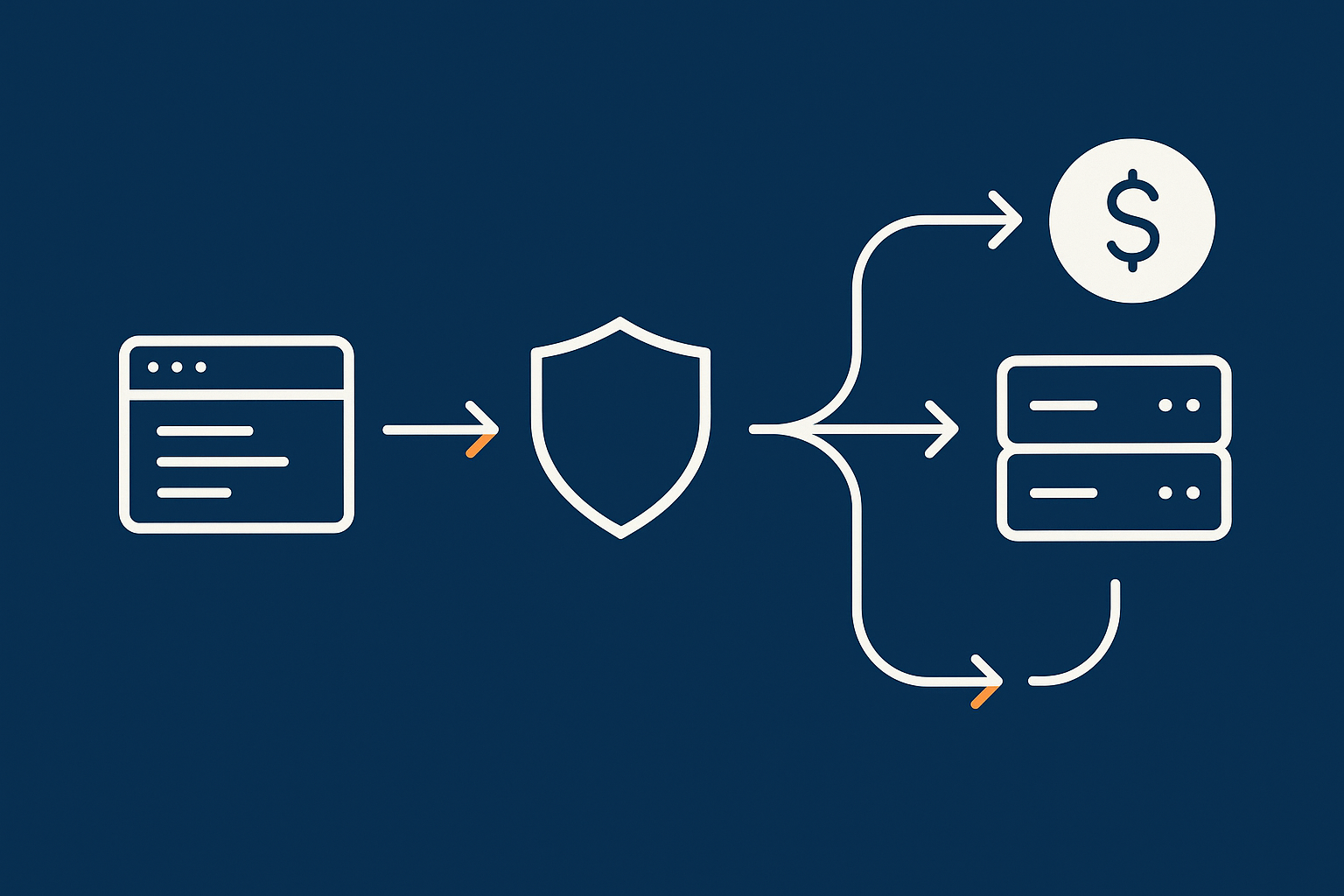
For many PCI‑conscious shops, a pragmatic reference architecture looks like this:
- User’s browser connects via HTTPS to your domain.
- Traffic hits the network edge such as the G7 Acceleration Network or another content delivery / edge security layer. Here, caching, TLS termination, image optimisation and WAF rules are applied.
- Filtered, valid requests are passed to your web / application server, which runs WordPress and WooCommerce.
- The application server connects to a separate database server (or at least a separate logical database layer) for orders, products and users.
- For card payments, the checkout page either redirects the customer to the gateway or loads hosted payment fields directly from the gateway. Card data goes from the browser to the gateway without passing through your servers.
This flow keeps your hosting environment focused on serving pages and storing order data, not cardholder data.
Separating web, database and admin access in practice
Even on a modest scale, aim for a clear separation of roles:
- Public web / app layer: serves the site to visitors. Access is restricted to HTTPS on standard ports, with database and SSH ports blocked from the internet.
- Database layer: accessible only from the application servers and management networks, not directly from the internet.
- Admin access: protected behind strong authentication, IP restrictions or VPN where feasible. Consider separate admin subdomains or paths, with extra WAF scrutiny.
This can all exist on a single VDS logically segmented, or on separate servers in a multi‑tier architecture. Our article Designing a Sensible Multi‑Tier Hosting Setup explores these patterns in more detail.
Where your payment gateway, PSP and acquirer sit in this picture
It is helpful to visualise where payments flow once they leave your site:
- Your website initiates a payment by redirecting the customer or loading hosted fields tied to your payment gateway / PSP.
- The gateway, which operates its own PCI‑certified infrastructure, collects card data and interacts with the acquiring bank and card networks.
- Your site receives either a success or failure notification and updates the order status accordingly.
Architecturally, your hosting should treat the gateway as an external, trusted payment service, rather than trying to replicate its functions. The integration surface should remain as small and well documented as possible.
Security Controls That Matter Most For PCI‑Conscious Hosting
Network‑level controls: firewalls, WAF, bad‑bot filtering and DDoS posture
From a hosting viewpoint, the most impactful PCI‑relevant controls at the network level are:
- Properly configured firewalls that limit open ports to what is strictly required.
- Web Application Firewalls tailored to common CMS patterns, blocking SQL injection, cross‑site scripting and other web attacks.
- Bad‑bot and abuse filtering that reduce brute‑force attacks against admin logins or known plugin endpoints.
- Sensible DDoS posture so that volumetric events are managed gracefully and do not lead to cascading failures.
These controls are often implemented at or near the hosting provider’s edge. Customers who do not have deep in‑house security skills can benefit from hosted WAF and edge services that are maintained centrally.
Server‑level controls: patching, hardening and least‑privilege access
At the server layer, important controls include:
- Timely patching of the operating system, web server, PHP, database and installed packages.
- System hardening such as disabling unnecessary services, enforcing secure SSH configurations and applying sensible file permission patterns.
- Least‑privilege access, where only the people and services that genuinely need administrative access receive it, with separate accounts and logging.
- Centralised monitoring and alerting so that suspicious or abnormal activity is visible promptly.
If you run your own servers unmanaged, these tasks fall on your team. For many businesses, using managed hosting or managed VDS is a way to offload a large portion of this operational work onto specialists who do it every day.
Application‑level controls: WordPress hardening, plugins, logging and audit trails
On WordPress and WooCommerce, PCI‑relevant security is often decided by application‑level choices:
- Core, theme and plugin updates: keeping these current to close known vulnerabilities.
- Plugin selection: avoiding poorly maintained or unnecessary plugins, especially for checkout, user management or form handling.
- Hardening: limiting login attempts, enforcing strong passwords, using multi‑factor authentication for admin users, and restricting file editing via the dashboard.
- Logging and audit trails: keeping records of administrative actions, login activity and significant configuration changes, so that issues can be investigated later.
Security plugins can be part of the picture, but should not be your only line of defence. They work best when combined with strong network and server‑level controls.
Uptime, Redundancy and Disaster Recovery Through a PCI Lens

What ‘good enough’ resilience looks like for payment‑taking sites
PCI DSS does not demand five‑nines uptime, but it does expect that you protect data and can recover from incidents. Your business needs to balance:
- Acceptable downtime: how long can your shop be offline before it materially harms revenue or reputation.
- Data integrity: how much order or customer data you can afford to lose between the last backup and an incident.
For many merchants, “good enough” includes:
- Daily or more frequent backups with off‑site storage.
- Reasonable infrastructure redundancy such as mirrored storage and resilient power and network at the data centre level.
- A tested recovery process you can execute confidently, documented in plain English.
Backups vs redundancy vs failover: how they differ, and what PCI cares about
These terms are often confused:
- Backups are point‑in‑time copies of data you can restore later. They help with accidental deletion, corruption, or certain security incidents.
- Redundancy means having duplicate components (for example, RAID storage, dual power feeds) so that a single failure does not cause downtime.
- Failover is the automatic or manual switchover to another system if the primary one fails, often in a different location or availability zone.
PCI is particularly concerned that you protect cardholder data and other sensitive data from loss or corruption and that you can continue processing, or resume processing, in a controlled way. Even if card data never touches your servers, customer and order information still deserves this level of care.
Single data centre vs multi‑site: when you should consider cross‑site resilience
Running in multiple data centres or regions can protect you against rare but higher‑impact events that affect an entire site. It also introduces cost and complexity.
Consider multi‑site resilience if:
- Card payment processing is mission‑critical and downtime has large financial consequences.
- You have regulatory or contractual reasons to maintain higher levels of continuity.
- You already have the operational maturity to manage more complex infrastructure, or you are using a managed service that provides this without heavy burden on your team.
For many smaller PCI‑conscious businesses, a single well run data centre with strong backups and clear recovery plans provides a good balance between risk and complexity.
Working With a PCI‑Conscious Hosting Provider Without Over‑Engineering
Questions to ask your host about PCI, responsibility and scope
When evaluating or talking to your hosting provider, useful questions include:
- “Do you offer PCI conscious hosting, and what does that mean in your environment?”
- “Which parts of PCI‑related security are you responsible for, and which are mine?”
- “How do you handle patching, backups and incident response on the services I am buying?”
- “Do you provide network‑level protections such as WAF or edge filtering?”
- “What documentation can you provide to support my PCI SAQ, especially around infrastructure security?”
The goal is to have a clear picture of how your responsibilities and the host’s responsibilities combine into a coherent, PCI‑conscious whole.
Where managed hosting and managed VDS meaningfully reduce your risk
Managed hosting and managed VDS come into their own when:
- Your in‑house team is small and already busy with product and marketing work.
- You do not have capacity to monitor security advisories, patch servers promptly or tune performance.
- Downtime or serious security issues would have material impact on revenue or reputation.
In these circumstances, paying for a managed service can be a rational way to reduce operational risk and free up internal time. It will not outsource PCI compliance completely, but it significantly reduces the chance of incidents caused by overlooked system administration tasks.
Keeping an architecture roadmap: how to avoid constant rebuilds as you grow
Rather than reinventing your hosting every year, treat it as a roadmap. Typical stages might be:
- Start with well configured shared or small VDS hosting and redirect‑based payments.
- Move to a dedicated VDS with stronger segregation and edge services as traffic grows.
- Introduce multi‑tier architecture and more advanced resilience when volume and business risk justify it.
Planning this progression in advance helps you avoid rushed, reactive migrations. Our article Designing a Hosting Architecture Roadmap offers a structured way to plan over a three‑year horizon.
Common Mistakes PCI‑Conscious Businesses Make With Hosting (And Better Options)
Relying on security plugins instead of network‑level protection
Security plugins have their place, but they act inside your application. They cannot protect against all types of attack, and they only see traffic after it has reached your server.
A better approach is layered:
- Use WAF and edge filtering to stop obvious attacks and abusive traffic before it hits PHP.
- Apply server‑level hardening and patching.
- Use application‑level security plugins as an additional layer for specific needs such as login protection or two‑factor authentication.
Treating ‘PCI compliant’ as a marketing badge instead of a shared responsibility
Some hosting and payment products use “PCI compliant” as a simple label, which can mislead businesses into thinking they have nothing else to do.
In reality:
- Your payment gateway may be PCI certified, but your own processes, code and hosting choices still matter.
- A host can provide an environment suitable for PCI‑conscious operation, but your configuration and maintenance are part of the equation.
- PCI compliance is assessed at the merchant level, not by simply buying a product.
Viewing PCI as a shared responsibility leads to better conversations with both your gateway and your hosting provider.
Over‑complicating before you need to: when a simple design is safer
It is easy to over‑engineer. Multi‑region clusters, exotic database technologies and microservices architectures can be useful for some, but they also:
- Increase the surface area for configuration mistakes.
- Demand more monitoring, documentation and operational discipline.
- Make it harder for smaller teams to understand and safely change the system.
For many PCI‑conscious businesses, a simpler, well understood architecture with good edge protection, regular maintenance and clear processes is safer than an ambitious design that nobody fully understands.
Next Steps: Turning PCI‑Conscious Hosting Principles Into a Concrete Plan
Map your current architecture, risks and payment flows
Begin with a short, honest inventory:
- Where is your site hosted, and in what model (shared, VPS, VDS, dedicated)?
- Which payment gateways and plugins do you use, and how do they collect card data in practice?
- What backups, monitoring and security controls are in place today?
- Who has admin and server access, and how is it controlled?
Drawing a simple diagram of the data flow from customer to gateway and back again can make scope and responsibilities clearer for everyone involved.
Decide your next sensible step, not your ‘final’ state
Once you understand where you are, choose the next
- Switching your payment plugin to a redirect or hosted fields mode.
- Moving from shared hosting to a managed VDS for more control and resilience.
- Introducing an edge layer such as the G7 Acceleration Network for WAF and performance.
- Formalising backup and recovery procedures and testing them twice a year.
Where to go next for deeper PCI‑conscious hosting guidance
If you would like a second pair of eyes on your current setup or are planning a new architecture, it can be useful to talk through options with a provider that understands PCI‑conscious designs.
You are welcome to contact G7Cloud to discuss your current hosting, payment flows and risk tolerance, and to explore whether shared hosting, managed WordPress, a managed VDS or a more tailored solution is the right next step for your business. The aim is to help you choose something that is robust, understandable and proportionate to your needs, rather than pushing you into a one‑size‑fits‑all answer.