What ‘Redundancy’ Really Means in Hosting: From RAID to Dual Data Centres in Plain English
Who this guide is for (and why ‘redundancy’ keeps coming up)
Redundancy sounds technical, but the real question behind it is simple:
“What can break before my site goes offline, loses data or damages my reputation?”
This guide is for people who:
- Own or manage websites, applications or online stores, and
- Keep hearing terms like RAID, failover, high availability or 99.99% uptime, and
- Need to make reasonable hosting decisions without becoming full time infrastructure engineers.
You might be a digital agency owner, a technical founder, an in house marketer who ended up “owning” the website, or a developer who wants a plain language view to show stakeholders.
Typical situations where redundancy suddenly matters
Redundancy often moves from theory to priority when something painful happens, such as:
- A busy WooCommerce sale weekend is interrupted by a server failure.
- A booking site is down for two hours and the support team cannot keep up with calls.
- A shared hosting incident takes dozens of client sites offline at once.
- An agency loses a major client’s data after a hack or disk failure.
In each case, someone asks afterwards:
“Could we have designed this so that one failure did not take everything with it?”
That is what redundancy is about.
What you will be able to decide by the end
By the end of this guide you should be able to:
- Explain in plain English what redundancy is and how it differs from backups.
- Recognise the difference between marketing terms and actual architecture.
- Understand the main layers of redundancy from disks to dual data centres.
- Match different redundancy patterns to typical business situations.
- Ask hosting providers clear, specific questions that cut through vague promises.
You will not become a data centre engineer, but you will be able to make more informed, less stressful hosting decisions.
Plain English definition: what redundancy actually is (and is not)
Redundancy means having more than one of something so that if one piece fails, your service carries on.
A simple analogy:
- One delivery van for your business means a breakdown stops deliveries.
- Two vans means you can keep going if one is in the garage.
That second van is redundancy. In hosting, that “second van” might be an extra disk, an extra server or even an extra data centre.
Redundancy vs backups vs uptime guarantees
These terms are often mixed together, but they solve different problems.
- Redundancy keeps things running when something fails.
- Example: a server with multiple disks in RAID continues working when one disk dies.
- Backups give you a way to go back in time.
- Example: restoring yesterday’s database after accidental data deletion or a hack.
- Uptime guarantees are commercial promises, usually expressed as a percentage of time per month or year that a service will be reachable.
- They are not a technical feature by themselves. They depend on the architecture behind them.
A site can have RAID, daily backups and a high uptime guarantee, and yet still be vulnerable to several common problems if the overall design is weak.
If you want to explore uptime percentages in more depth, including “five nines”, see “Five Nines” and Other Myths: How to Realistically Evaluate Hosting Uptime Guarantees.
Failure domains: what problem are you actually trying to survive?
Redundancy only helps if it is designed around specific types of failure, often called failure domains. Examples include:
- Disk failure: a single hard drive or SSD dies.
- Server failure: a physical server has a motherboard, RAM or CPU issue.
- Software failure: a bad deployment or database bug breaks your application.
- Network failure: a switch, router or internet connection in the data centre fails.
- Data centre incident: power, cooling or other serious problems in one building.
- Regional event: natural disaster or prolonged outage affecting an entire region.
Each layer of redundancy in hosting is about choosing which of those failures you want to be able to ride through, and how much you are prepared to pay in money and complexity to do that.
The layers of redundancy in hosting: a quick overview
From disks to data centres: a layered model
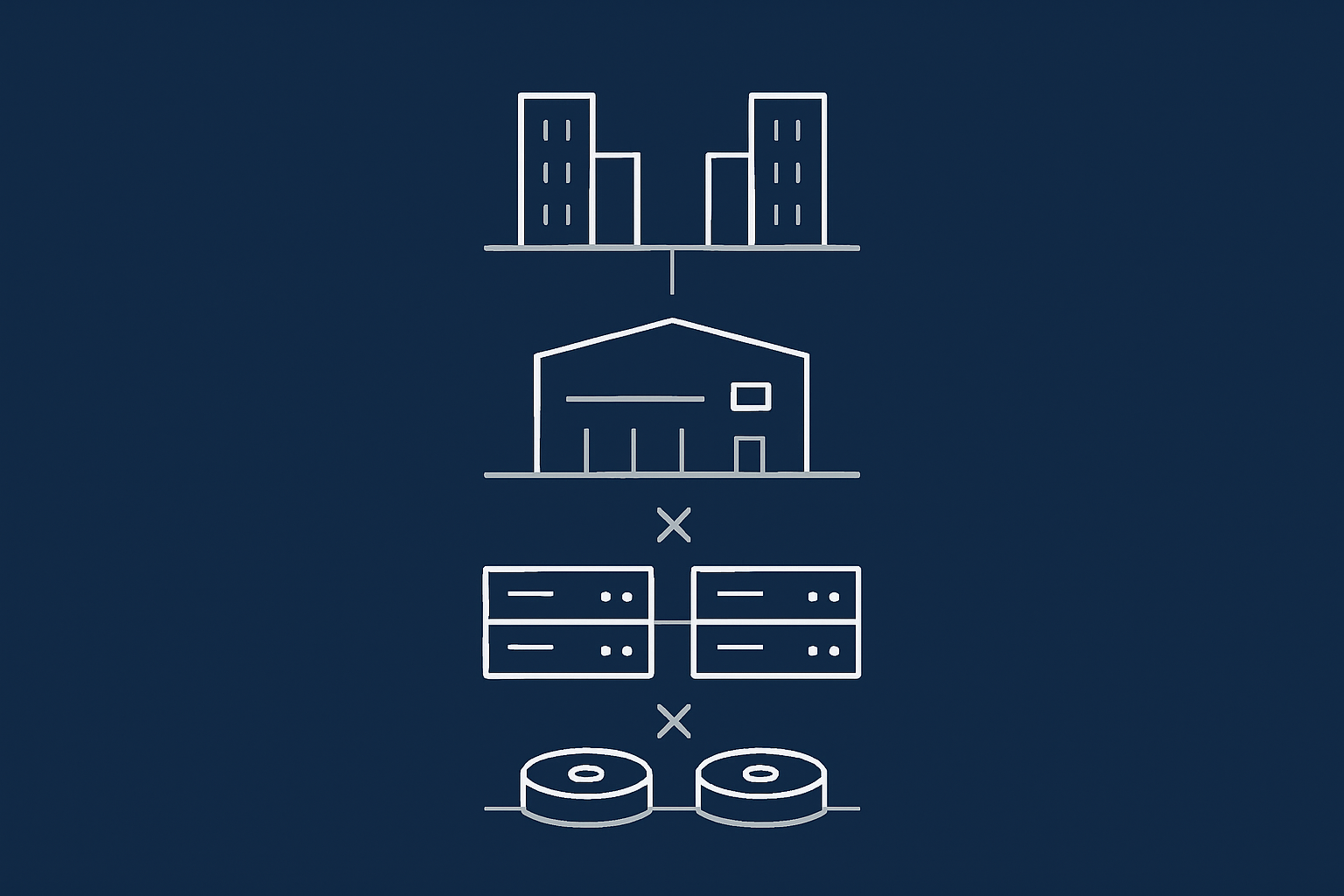
It helps to visualise redundancy as several layers on top of each other:
- Storage redundancy: multiple disks working together, usually with RAID.
- Server redundancy: more than one server available to run your application.
- Data centre infrastructure redundancy: multiple power feeds, UPS units, generators, and network paths inside one facility.
- Geographic redundancy: your application can run in more than one physical location or data centre.
Most hosting plans give you a subset of these layers. Very few businesses need every possible layer, all at once. The art is picking the layers that match your risk, budget and operational capacity.
How shared hosting, VPS and virtual dedicated servers typically handle redundancy
Typical patterns look like this:
- Shared hosting
- Many customer sites on one physical server.
- Usually has RAID storage and data centre level power/network redundancy.
- If the server itself has a serious fault, all sites on it are affected.
- VPS / cloud instance
- Virtual machine running on shared physical hardware.
- Storage may be on a shared SAN or network storage system with its own redundancy.
- Underlying infrastructure usually has good data centre redundancy.
- Virtual dedicated servers
- Fewer tenants per physical host, more predictable resources.
- Often paired with stronger SLAs and managed options for higher availability designs.
In all three cases, storage and data centre layers are often handled by the provider. Server level and geographic redundancy are typically design choices that sit with you, sometimes supported by managed services.
Layer 1: Storage redundancy with RAID – what it really protects you from
RAID in plain English: several disks acting as one
RAID stands for Redundant Array of Independent Disks. In plain terms, it means several disks work together to appear as one logical storage unit.
The goals are usually to:
- Keep working if one disk fails.
- Improve performance by spreading reads and writes across disks.
Think of it as having more than one tyre on each corner of a vehicle. If one goes flat, the wheel can still support the car long enough to reach a garage. You still need to fix the problem fairly quickly, but you are not stranded at the roadside immediately.
Common RAID levels you will hear about (and what they mean for risk)
You do not need to know every RAID level, but a few are worth recognising:
- RAID 1 (mirroring)
- Data is written identically to two disks.
- If one fails, the other continues to serve all data.
- Capacity is effectively that of a single disk.
- RAID 5 (striping with parity)
- Data is spread across at least three disks, with parity information to reconstruct data if one disk fails.
- Survives a single disk failure, but the rebuild process can be stressful on remaining disks.
- RAID 10 (striped mirrors)
- Combines mirroring and striping across at least four disks.
- Good performance and resilience, often used for databases.
- Costs more in disks, but usually offers better safety during rebuilds.
Your hosting provider will usually choose and manage the RAID level. What matters to you is understanding that:
- RAID is there to survive individual disk failures.
- It is not a substitute for backups or wider redundancy.
If you want formal details on RAID levels, the Wikipedia page on RAID is a reasonable reference: https://en.wikipedia.org/wiki/RAID.
Limits of RAID: when redundancy at disk level is not enough
RAID is often oversold. It does not protect you from:
- Accidental deletion: if you delete a file, RAID faithfully deletes it across all disks.
- Data corruption: corrupt data is happily written to every disk.
- Malicious activity: if a hacker encrypts your site or database, RAID protects their encrypted version just as carefully.
- Catastrophic server failure: if the whole server fails, your RAID array may be temporarily or permanently unavailable.
- Data centre problems: RAID sits inside one server, which sits in one building.
RAID also needs monitoring and maintenance. Disks must be replaced promptly. Rebuilds must be allowed to complete. This is often handled by your hosting provider, but it underlines why RAID is just the first layer.
What this looks like on shared hosting, VPS and VDS
In practice:
- Shared hosting: You rarely see RAID directly. The provider manages it and may mention “RAID protected storage” in marketing.
- VPS: Storage may be shared across multiple physical hosts. RAID and often more advanced storage systems help avoid data loss from single disk failures.
- Virtual dedicated servers: Often paired with higher grade storage and more predictable performance, with RAID as part of that baseline.
In all cases, RAID is usually included. It is important, but it does not, on its own, make your data “safe”.
Layer 2: Server level redundancy – active/passive, clustering and failover
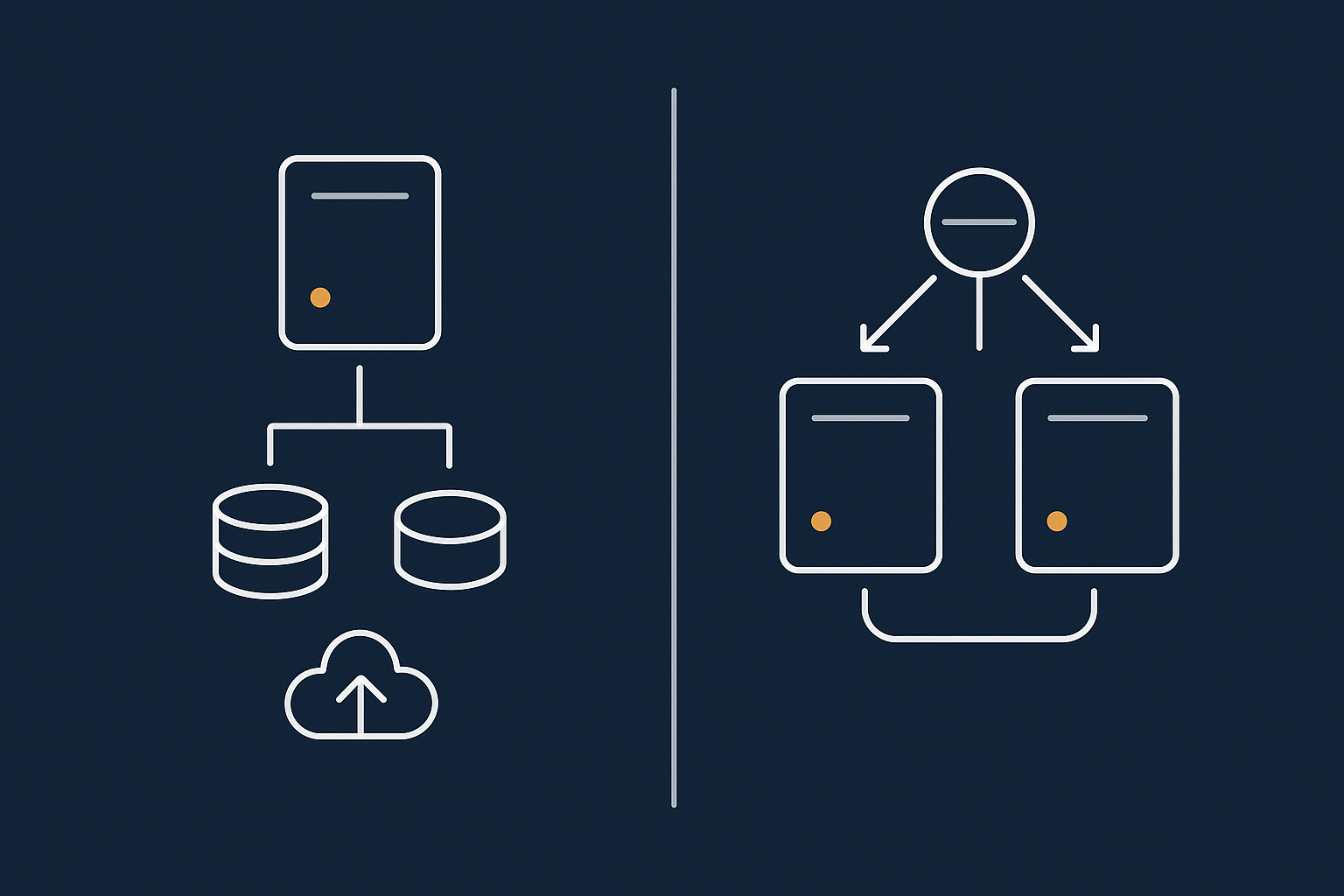
Single server with good backups vs true failover
Many small and medium sites run on a single server. You can do sensible things on that server:
- RAID for disk redundancy.
- Regular, verified backups.
- Monitoring and alerting.
This can be perfectly reasonable for:
- Brochure or content sites.
- Internal tools where short outages are acceptable.
- Low volume ecommerce where downtime is inconvenient but not disastrous.
However, this is still a single point of failure. If that server’s motherboard dies, or its hypervisor host fails, your site is offline until:
- The server is repaired, or
- Your site is restored to another server from backups.
True failover at the server level means there is at least one more server that can take over, ideally with minimal manual intervention and little or no data loss.
Active/passive: a warm spare server ready to take over
In an active/passive setup:
- The active server handles all traffic.
- The passive server is updated with the same data and configuration, but usually does not handle normal traffic.
- When monitoring detects a failure on the active server, traffic is switched to the passive one.
This can be achieved with:
- A database replicated to a second server.
- Application files deployed to both servers.
- A failover IP or load balancer changing which server is considered “live”.
Trade offs:
- Pros: Clear failover path, often simpler than active/active; easier to reason about.
- Cons: You pay for two servers even though one is mostly idle; requires monitoring, replication and tested failover processes.
For many SMEs, an active/passive setup for a key database or application server is a good middle ground when a single server feels too risky.
Active/active: multiple servers sharing live traffic
In an active/active setup:
- Two or more servers all handle live traffic at the same time.
- A load balancer spreads user requests across them.
- If one fails, the others keep going and the load balancer routes around the failure.
This can look like:
- Two web servers behind a load balancer, both serving the same application code and static assets.
- A multi node database cluster, with replication or sharding, for resilience and performance.
Trade offs:
- Pros: Better use of capacity; more resilient to failures; can handle more traffic.
- Cons: More complex deployments; harder testing; more moving parts to monitor; higher skill requirement.
This level of architecture is often where Enterprise WordPress hosting or managed multi server services can be useful, as the operational burden grows.
When it makes sense to move from one server to several
You might consider server level redundancy when:
- Downtime costs clearly outweigh the extra hosting and management costs.
- Your peak traffic is growing to the point one server is regularly near its limits.
- You have strong commercial commitments around uptime or SLAs with your own clients.
- Regulatory or contractual requirements call for higher resilience.
If you are deciding between a single server and a multi server architecture, this is covered in more depth in Single Server vs Multi Server Architecture: How to Decide When You Are Not on Public Cloud.
Layer 3: Network, power and data centre redundancy
Inside the data centre: how power and network redundancy actually work
A well run data centre treats power and network as critical layers of redundancy:
- Power
- Multiple grid feeds from separate substations where possible.
- Uninterruptible power supplies (UPS) to cover short interruptions.
- Diesel generators to handle longer grid outages.
- Power distribution designed so that one failure does not darken a whole hall.
- Network
- Multiple upstream providers (“transit”) so loss of one carrier does not cut you off.
- Redundant core routers and switches.
- Physically diverse fibre paths out of the building.
These measures greatly reduce the risk that a simple power cut or network issue takes your site offline. For more detail on these aspects, you can explore Inside a Data Centre: What Really Matters for Power, Cooling and Network Redundancy.
What ‘N+1’ means in practice
You may see claims like “N+1 power” or “N+2 generators”.
- N means the number of units needed to support the load.
- N+1 means there is one extra redundant unit beyond that.
For example, if a facility needs three UPS units to run all equipment safely:
- N = 3 UPS units required.
- N+1 = 4 UPS units installed, so one can fail or be maintained without downtime.
This pattern applies to generators, cooling chillers and often network devices as well.
Why you still need application level planning on top of data centre resilience
Strong data centre redundancy is vital, but it only protects you from infrastructure issues inside that building.
Your application can still be unavailable because of:
- Bugs in code or plugins.
- Database corruption.
- Configuration mistakes or failed deployments.
- Heavy load from a marketing campaign or bot traffic.
This is why you see a layered approach: the data centre protects the building; servers and storage protect against hardware faults; your application architecture and operational processes protect against software issues and growth.
Layer 4: Geographic redundancy – dual data centres and disaster recovery
The difference between high availability and disaster recovery
The terms “high availability” (HA) and “disaster recovery” (DR) are related but not identical:
- High availability focuses on minimising short, unplanned outages.
- Disaster recovery focuses on recovering from rare but major incidents, such as losing a whole data centre.
Geographic redundancy is a core part of DR. It means your critical systems can be started or continued in another region if your primary location suffers a serious problem.
For some businesses, HA within one data centre is enough. For others, especially those with national or international customers and strict SLAs, dual data centres are a practical requirement.
Typical dual data centre patterns for web and ecommerce
Common patterns include:
- Active/passive across two sites
- One primary data centre serves all live traffic.
- A secondary site holds replicated data and application servers, but only takes traffic during an incident.
- Failover might be manual (an engineer switches DNS or routing) or semi automatic.
- Active/active across two sites
- Both data centres serve traffic all the time.
- Traffic is split by DNS, anycast or global load balancing.
- Databases are replicated in real time with conflict handling.
Active/active across regions is powerful but complex. It generally makes sense only for larger organisations with strong in house or managed operations capability.
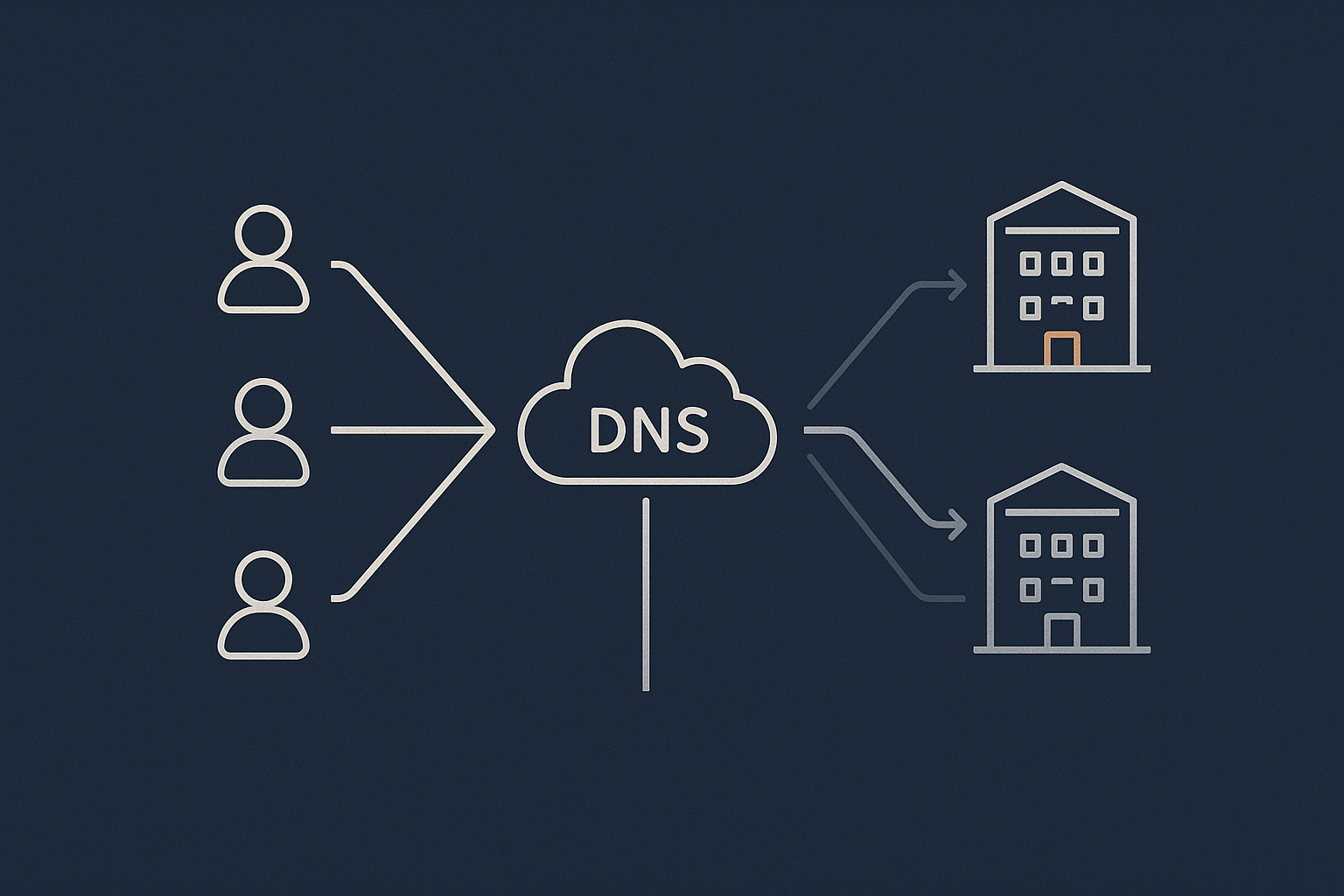
How DNS, health checks and automatic failover fit into the picture
At geographic scale, traffic is usually steered with some combination of:
- DNS: Returning the IP address of the currently healthy site (or both sites).
- Health checks: Automated probes that test whether an endpoint is responding correctly.
- Failover logic: Rules that say “if these checks fail in region A, send users to region B”.
Time to failover depends on:
- How quickly health checks detect a problem.
- DNS time to live (TTL) values and how resolvers respect them.
- How up to date the secondary site’s data is.
This is one of the reasons many businesses lean on managed services for DR. Getting health checks, DNS and data replication all aligned and tested is operationally demanding.
Costs, complexity and realistic recovery times for SMEs
For most small and mid sized organisations, a realistic approach might be:
- Strong single data centre architecture with server level redundancy.
- Frequent, off site backups with tested restores.
- A documented plan to rebuild services in a second region within a defined time window (for example 4 to 24 hours).
A fully synchronous, dual data centre, active/active solution is often disproportionately expensive and complex for SMEs. It can be justified when:
- Every minute of downtime has significant financial or operational impact, and
- There is a team or managed provider in place to operate and test the setup continuously.
If you are specifically planning DR, there is a deeper guide at From Backups to Business Continuity: Building a Realistic Disaster Recovery Plan with Your Hosting Provider.
Backups vs redundancy: how they work together (and what they do not cover)
Examples: hardware failure, data corruption, hacked site
It helps to walk through a few scenarios.
1) Hardware failure
- RAID protects against single disk failure.
- Server redundancy protects against a whole server dying.
- Data centre redundancy protects against power and network incidents.
- Backups are a last resort if several layers fail at once.
2) Data corruption or bad deployment
- Redundancy will faithfully replicate the mistake or corruption.
- Backups allow you to roll back to an earlier clean state.
- Version control and deployment processes help avoid repeating the issue.
3) Hacked site
- Redundancy keeps a hacked site online more reliably, which is not helpful by itself.
- Security controls, such as WAF rules and good patching, reduce the chance of compromise.
- Backups let you restore a known good version once you have cleaned and secured the environment.
- Stronger web hosting security features and practices reduce both risk and recovery time.
How often you really need backups when you already have redundancy
Redundancy does not change the need for backups. It mainly changes the frequency and retention that are sensible.
As a rough guide:
- Content sites: Daily backups, with weekly and monthly retention, are often enough.
- Busy ecommerce: Hourly database backups, plus daily full backups, are common.
- Mission critical systems: Near real time replication plus frequent point in time backups are normal.
Redundancy addresses availability. Backups address data integrity and mistakes. You need both, at different levels, depending on how painful it would be to lose data or be offline.
Where responsibility usually sits: provider vs your team
Broadly:
- Hosting provider is typically responsible for:
- Data centre level redundancy (power, cooling, network).
- Hardware level redundancy such as RAID and power supplies.
- Base backup systems as described in your plan.
- Restoring from backup on request.
- You or your development team are usually responsible for:
- Deciding what backup frequency and retention you need.
- Checking that restores work with your application.
- Application level redundancy choices (for example multi server design).
- Security practices inside the application (passwords, plugins, code).
Managed hosting can move some of the application level responsibility back towards the provider, but it is always worth clarifying who does what in writing.
Common marketing claims and misunderstandings about redundancy
‘RAID means your data is safe’ and other half truths
RAID is sometimes pitched as a safety blanket. It is helpful, but:
- It only covers specific hardware failures.
- It does not protect against deletion, hacks or software faults.
- It cannot cancel the need for off server backups.
A better interpretation is: “RAID reduces the risk that a single disk failure will cause downtime or immediate data loss”.
‘99.99% uptime’ without explaining the architecture
Uptime figures are only meaningful if you understand what is behind them:
- Is the figure for the data centre, the hosting platform as a whole, or your specific service?
- Does it rely on you building a multi server setup?
- What exclusions and maintenance windows are listed in the SLA?
When you see a high uptime number without an architectural explanation, treat it as a signal to ask more questions, not as a guarantee that everything is highly redundant.
‘Instant failover’ that actually means ‘we will restore from backup’
True instant or near instant failover usually needs:
- Standby servers or a second site already running.
- Up to date replicated data.
- Automatic health checks and routing.
If a provider says “instant failover” but, when pressed, describes restoring a backup to a new server, that is not failover. That is recovery, and it will take longer and may lose some recent data.
Questions to ask any host about their redundancy claims
Useful questions include:
- “What happens if a disk fails on my server?”
- “What happens if the physical host my VPS runs on fails?”
- “What components are redundant within the data centre?”
- “Is there any automatic failover to another server or site?”
- “How are backups stored, how long are they kept and how do restores work in practice?”
Look for clear, concrete answers such as “your VPS is replicated to another host and will restart there automatically” rather than general assurances.
Choosing the right level of redundancy for your business
Step 1: Map business impact and acceptable downtime
Before looking at technologies, clarify:
- How much revenue or reputation you lose per hour of downtime.
- Whether your site is the only channel for a critical process (for example bookings or order capture).
- Legal, contractual or compliance obligations around availability.
- The size and skills of the team who will operate the solution.
This will help you decide if a one hour outage is an inconvenience or a serious incident, which in turn shapes what is worth investing in.
Step 2: Match simple redundancy patterns to common scenarios
Some broad matches:
- Brochure / content sites
- Single server (shared, VPS or VDS) with RAID, good backups and monitoring.
- Optional: use a global caching layer such as the G7 Acceleration Network to offload traffic and improve resilience for static content.
- Business critical lead generation or booking
- Single high quality server at minimum, often a Virtual dedicated server.
- Strong backups, plus at least some active/passive redundancy for the database or entire application.
- Performance and security features to handle traffic spikes and abusive traffic.
- Revenue critical ecommerce
- Multi server architecture for web and database tiers.
- Possibly multi availability zone or cross data centre options, depending on scale.
- Tighter monitoring, alerting and managed operations.
Step 3: When to consider managed VDS or enterprise architectures
It is worth exploring managed hosting or enterprise style architectures when:
- You are moving beyond a single server setup.
- Downtime or data loss would have serious commercial consequences.
- Your in house team is small, or operational expertise is limited.
Managed virtual dedicated servers and related services can absorb much of the operational complexity around redundancy, failover, monitoring and security, while still giving you clear control over cost and architecture choices.
If you are deciding how far to go with managed services, see When Managed Hosting Makes Sense for Growing Businesses.
Practical examples: WordPress brochure site vs busy WooCommerce store
Low risk brochure or content site: sensible redundancy on a single server
Imagine a typical WordPress brochure site:
- Leads mainly arrive via email and phone as well as the site.
- Downtime is inconvenient but not disastrous if it lasts under an hour.
- Content changes daily or weekly, not minute by minute.
A reasonable setup could be:
- Shared or VDS hosting with RAID storage.
- Daily backups with a few weeks of retention.
- Monitoring that alerts someone if the site is down.
- Optional use of the G7 Acceleration Network to cache pages and optimise images globally, reducing load on the origin server and improving resilience against traffic spikes.
Here, spending heavily on multi server clusters or dual data centres is unlikely to be good value.
Business critical lead generation or booking site
Now consider a site where:
- Most leads or bookings come through web forms.
- Downtime during office hours directly reduces sales or service capacity.
- Campaigns can create sharp spikes in traffic.
A more resilient approach might be:
- A dedicated or virtual dedicated server so noisy neighbours cannot affect you.
- RAID storage plus robust daily and hourly backups.
- At least active/passive redundancy for the database, with a warm standby.
- A caching layer, such as the G7 Acceleration Network, to:
- Cache static assets and some dynamic pages.
- Optimise images to AVIF and WebP on the fly, reducing size and server load.
- Filter abusive or bot traffic before it hits your application.
Managed hosting may be appropriate here, especially if you lack in house skills to maintain database replication, health checks and failover procedures.
Revenue critical WooCommerce store: multi layer redundancy and PCI concerns
Finally, consider a busy WooCommerce store where:
- Most revenue flows through the site.
- Marketing campaigns and seasonal peaks create high, spiky traffic.
- Cardholder data security and uptime are part of client or partner expectations.
In this case, a stronger architecture could include:
- Multiple web servers behind a load balancer, running the WordPress codebase.
- A high availability database cluster with failover capabilities.
- Storage redundancy on each server plus regular off site backups.
- Use of the G7 Acceleration Network to handle static content, image optimisation and initial traffic filtering.
- Network and application security measures aligned with PCI conscious hosting expectations, even if you offload card processing to a third party gateway.
In this sort of environment, redundancy is about more than staying online. It is also about maintaining trust and meeting security and compliance expectations. Many businesses sensibly choose managed or enterprise hosting here, handing operational risk and complexity to a provider with the right expertise.
How to talk to your hosting provider about redundancy and failover
Information you should bring to the conversation
You will get better, more concrete proposals if you can explain:
- How much downtime is acceptable in a typical month or year.
- Which hours or days are most critical for availability.
- How often your data changes and how much data loss you can tolerate (for example “no more than 15 minutes”).
- Any compliance or contractual obligations you have around uptime and security.
- What in house technical skills you have and what you would prefer the provider to operate.
Concrete questions that cut through marketing language
To turn vague claims into specifics, you can ask:
- “Which exact components are redundant for my service, and which are single points of failure?”
- “If a server fails at 3am, talk me through what happens, minute by minute.”
- “Where are my backups stored, and how long would a typical restore take?”
- “Is there any automated failover, or would someone need to log in and make changes?”
- “How often is failover tested, and can we schedule a test?”
Good providers will welcome these questions and answer clearly. If the answers are vague, keep probing until you are comfortable you understand the real behaviour.
What belongs in an SLA or written hosting proposal
Your SLA or proposal should describe, in plain language where possible:
- Which redundancy layers are in place (for example RAID, multi server, dual data centre or not).
- Backup frequency, retention and restore processes.
- Expected response times for incidents and support requests.
- Any uptime targets and what happens if they are missed.
- Who is responsible for monitoring, patching and failover operations.
This is not about legal fine print. It is about agreeing shared expectations before an incident, so everyone knows how the system is meant to behave.
Summary: building realistic resilience without over engineering
Redundancy is not a magic bullet. It is a set of practical choices about:
- Which failures you want to survive.
- How much downtime you can accept.
- How much complexity your team can operate reliably.
- How much budget you can sensibly assign to resilience.
From RAID for disks, through multi server setups, to dual data centres, each layer reduces some risks while adding cost and operational overhead. Backups and security sit alongside redundancy, not beneath it.
You do not need to build the sort of architecture used by a global bank for a local brochure site. Equally, it is worth moving beyond basic shared hosting if your business depends on online revenue or continuous lead generation.
If you would like help mapping these concepts to your own situation, you are welcome to talk to G7Cloud about sensible hosting architectures, from robust single server setups through to managed virtual dedicated servers and multi server designs, so you can reduce operational risk without over engineering.