Security Incidents in Web Hosting: Getting the Balance Right Between Prevention and Mitigation
Introduction: Why Security Incidents Are a “When”, Not an “If”
For most organisations, the website is now part of the core business. It may directly take payments, collect leads, run bookings or provide critical information to customers.
That means security incidents are no longer just an “IT problem”. They affect revenue, reputation and sometimes regulatory obligations.
What a security incident actually means in web hosting
In the context of web hosting, a security incident is any event that compromises one of three things:
- Confidentiality Data is seen by people who should not see it.
- Integrity Data or content is changed without permission.
- Availability Systems are taken down or made unusable.
That covers a wide range of situations, for example:
- Your WordPress home page is replaced with spam or a political message.
- Attackers upload malicious code that sends outbound spam from your server.
- Admin passwords are stolen and used to create new, hidden administrator accounts.
- Database backups are exposed in a public folder and downloaded by third parties.
Not every incident is a headline data breach. Many are messy, confusing and time consuming rather than catastrophic. The common factor is that something has happened which you did not intend, and you need to respond.
Why even careful businesses still face incidents
Many teams feel they have “done security” once they have:
- bought an SSL certificate,
- installed a security plugin, and
- chosen a reputable host with good web hosting security features.
Those are useful steps, but they are not the whole picture.
There are three reasons incidents remain likely even for careful organisations:
- Complexity Modern sites are built from many components: CMS, plugins, themes, payment gateways, third party scripts and integrations. Every piece is another potential issue.
- Dependencies You rely on others to be secure: plugin authors, theme developers, SaaS providers, your hosting provider and even your own users’ behaviour.
- Change over time A site that was secure enough in 2021 may not be secure enough today. New vulnerabilities and attack patterns appear continuously.
Security incidents are therefore a normal operational risk to plan for, rather than a sign that someone has completely failed.
Prevention vs mitigation in plain English
You can think about security like fire safety in a building:
- Prevention is everything you do to reduce the chance of a fire starting in the first place. For example, safe wiring, smoke alarms, clear rules about smoking and regular inspections.
- Mitigation is everything you do so that if a fire does start, it does limited damage and people can recover quickly. For example, sprinklers, fire doors, evacuation plans and insurance.
In hosting terms:
- Prevention includes hardened servers, a web application firewall (WAF), regular patching, strong passwords, and careful configuration.
- Mitigation includes monitoring and alerts, incident response plans, usable backups, tested restore procedures and sensible communication plans.
This article focuses on getting the balance right, so that incidents become manageable events rather than business defining crises.
The Most Common Security Incidents Businesses See
Security incidents come in patterns. Understanding the common ones can help you focus effort where it makes the most difference.
Defacement, malware and spam campaigns
Defacement and malware infections are among the most visible incidents:
- Your site shows unwanted banners, gambling links or unrelated adverts.
- Search engines flag pages as “potentially hacked” or “unsafe”.
- Your hosting provider warns that your site is sending spam or hosting phishing pages.
These issues often start with a small foothold: for example, a single outdated plugin that allows file uploads. From there, automated scripts place malicious files and sometimes insert hidden links throughout your content.
Mitigation here is about early detection and fast clean up, combined with finding and closing the original entry points.
Credential theft, admin account abuse and weak passwords
Attackers do not always need a sophisticated exploit. Often they just need one working login.
Typical routes include:
- Reusing passwords from another breached site.
- Phishing emails convincing someone to enter their control panel credentials.
- Brute forcing weak admin passwords that lack two factor authentication.
Once they have an account, attackers may:
- Install malicious plugins or themes.
- Create new, hidden admin users.
- Change payment settings or add their own payment gateway.
This kind of incident is particularly common on content management systems such as WordPress and ecommerce platforms such as WooCommerce.
Vulnerable plugins, themes and application code
A large proportion of web incidents arise from vulnerabilities in the application layer rather than the underlying server.
Common examples include:
- Outdated WordPress or plugin versions with known security issues.
- Custom code that does not validate user input properly.
- File upload features that do not restrict allowed file types.
Attackers track newly disclosed vulnerabilities and scan the internet for sites that still run the vulnerable versions. In many cases, the hosting platform is fine but the application stack is not.
If you run WordPress, our article How to Keep WordPress Secure Without Constant Firefighting goes deeper into day to day practices that reduce this risk.
Infrastructure level issues: hacked servers, abused email, data exposure
Below the application, there is infrastructure: servers, containers, control panels, databases, network storage and mail services.
Incidents here tend to be less visible at first but can have broader consequences, for example:
- Compromised SSH or control panel access giving broader control over multiple sites.
- Open database ports accessible from the internet.
- Exposed backup archives publicly downloadable from misconfigured storage.
- Misused email services sending large volumes of spam, which then damages your domain and IP reputation.
These are the issues where the line between what the hosting provider manages and what you manage becomes especially important. We discuss that split of responsibility in more detail in Understanding Hosting Responsibility: What Your Provider Does and Does Not Cover.
Why most attacks are automated, not personal
It is easy to imagine an attacker who has chosen your business specifically. That does happen, but it is not the norm.
Most of the time, attacks are automated. Scanners search large portions of the internet, looking for:
- particular software versions,
- certain URL patterns, and
- known misconfigurations.
Once they find a match, scripts try a set of standard techniques, from brute force login attempts to known file upload exploits. Your site is not being targeted because of who you are, but because you match a pattern.
This has two important implications:
- Even modest sites with low traffic are probed regularly.
- Up to date, basic security hygiene removes you from the easiest “targets of opportunity”.
What Prevention Really Looks Like in Hosting
Effective prevention is a set of layers that work together, not one single silver bullet product or feature.
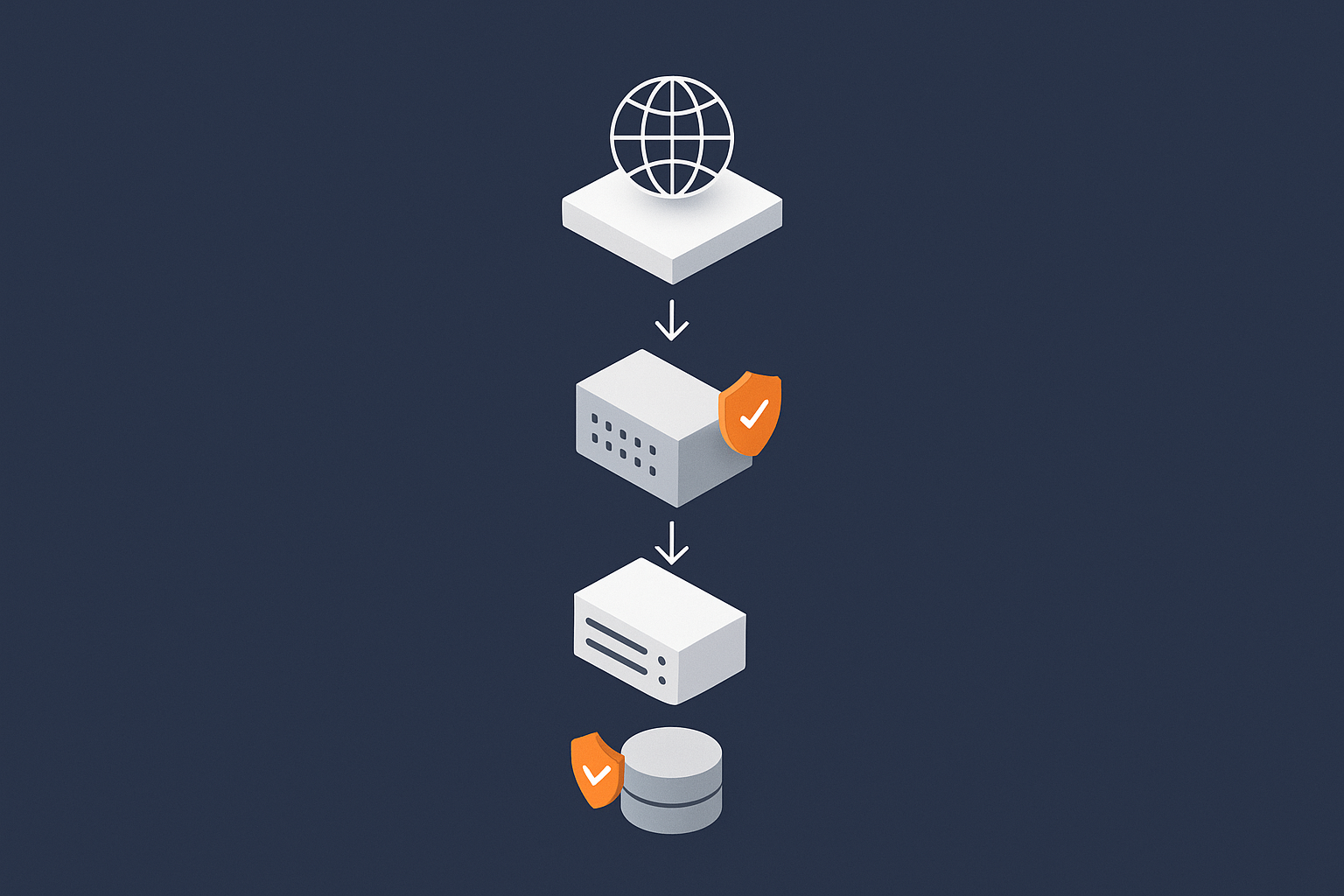
Layered defences: from the network edge to the application
A typical hosting setup can be thought of as several layers:
- Internet All users and bots trying to reach your site.
- Edge protection Content delivery networks, WAFs and traffic filters.
- Web server Nginx, Apache or similar.
- Application WordPress, a custom app, WooCommerce, etc.
- Database and storage Where your data actually lives.
Each layer can apply security controls:
- Blocking or rate limiting hostile traffic before it reaches the server.
- Verifying that HTTP requests make sense and are not trying known exploits.
- Enforcing permissions so that one compromise does not automatically grant access to everything.
Managed environments and services such as the G7 Acceleration Network help here by placing protective logic at the edge, before requests get near your application. This is particularly useful for high traffic sites and those facing a lot of automated scanning.
Traffic filtering and WAF rules: stopping bad bots and obvious attacks
Traffic filtering and WAFs are sometimes seen as performance tools. They are also a strong part of prevention.
Useful capabilities include:
- Blocking known bad IP ranges to avoid repeated brute force attempts.
- Rate limiting login pages and other sensitive endpoints.
- Recognising common exploit patterns such as SQL injection and cross site scripting payloads.
- Filtering obvious bot traffic so it does not even reach your server.
The G7 Acceleration Network combines these kinds of controls with caching and on the fly image optimisation. That reduces load on your origin servers and filters a significant volume of abusive traffic before it can cause issues.
Keeping the software stack patched and hardened
Patching is one of the most reliable preventative controls you can use, but it requires discipline.
For infrastructure you manage yourself (for example a VPS), you will typically need a regular process to:
- Apply operating system and control panel updates.
- Patch services such as PHP, MySQL/MariaDB, Nginx or Apache.
- Restart services in a controlled way.
If you are not familiar with server patching, our guide How to Safely Update and Patch a Linux Server (Without Breaking Your Sites) is a practical place to start.
“Hardening” usually covers additional steps, such as:
- Disabling unnecessary services and ports.
- Using secure defaults for SSH, SFTP and database access.
- Restricting direct root logins.
With shared hosting or managed environments, much of this is handled by the provider. In those setups, your focus shifts to keeping the application code itself updated.
Account hygiene: passwords, 2FA, users and file permissions
Account hygiene is one of the cheapest and most effective preventative measures. It includes:
- Unique, strong passwords stored in a password manager rather than reused across services.
- Two factor authentication (2FA) on hosting control panels, admin dashboards and critical third party services.
- Least privilege user roles so that people only have the access they actually need.
- Regular user reviews to remove old staff accounts, developers who no longer work with you, and temporary access that never got revoked.
File and directory permissions also matter. For example, ensuring that configuration files with database credentials are not writable by the web server user can limit escalation if one site is compromised.
Configuration and architecture choices that reduce risk
Certain design choices reduce the overall risk of an incident or at least limit its scope:
- Separating staging and production environments, so experiments do not run on live data.
- Using different user accounts and passwords for each site or database.
- Isolating particularly sensitive components, for example running the admin area of a site over a VPN or restricted IP range.
- Avoiding “one huge account” that mixes many unrelated sites with different risk profiles.
Sometimes the right answer is to move from shared hosting to a VPS or to virtual dedicated servers, not for performance but for better isolation between workloads. That shift can reduce the impact one compromised site has on others.
The Limits of Prevention: Why You Still Need Mitigation
Even strong preventative measures have limits. Understanding those limits is the basis for good mitigation planning.
Zero days, supply chain issues and human mistakes
Some incidents result from factors that are hard to prevent completely:
- Zero day vulnerabilities where attackers exploit a weakness before there is a public fix.
- Supply chain issues such as compromised plugins, themes or third party libraries.
- Human mistakes including misconfigurations, wrong file uploads or accidental exposure of credentials.
In each case, you can reduce risk but not remove it entirely. For example, code review and minimal dependencies lower the chance of a supply chain issue, but they do not make it impossible.
Why “100% secure” is not a realistic promise
No responsible hosting provider or security specialist will promise “100% secure”. The more accurate statement is that they can help you lower both:
- the probability of incidents, and
- the impact when incidents happen.
Security is also constrained by cost, time and usability. For example, forcing every internal process through a complex VPN may reduce some risks, but it can increase operational friction and the chance of people working around the controls.
Pragmatic security is about choosing sensible measures for your threat level and resources, then backing them up with solid mitigation plans.
How shared hosting, VPS and virtual dedicated servers differ in blast radius
The “blast radius” of an incident is how far the damage can spread from the original entry point.
- Shared hosting Multiple customers share the same underlying server and operating system environment. Good providers isolate accounts strictly, but by design you share more infrastructure. A misconfiguration or platform level exploit can in theory affect many sites.
- VPS You have your own virtual machine instance. Other customers share hardware, but your operating system is separate. The blast radius is mainly within your own VPS and whatever you host on it.
- Virtual dedicated servers You have more dedicated resources and stronger isolation. Incidents on one virtual dedicated server are far less likely to affect others, and you have greater control over security posture.
The more isolation you have, the more control you gain, but also the more responsibility you take on. That trade off is important when thinking about prevention and mitigation.
Mitigation: How to Contain Damage When Something Does Go Wrong
Mitigation is about reducing harm after an incident starts. Speed and clarity matter more than perfection.

Detection: how you know there is a security incident
You cannot respond if you do not know something is wrong. Common detection signals include:
- Monitoring alerts for unusual traffic patterns or resource usage.
- Security plugin warnings about file changes or login attempts.
- Customer reports that the site looks different or shows warnings.
- Emails from payment providers, card schemes or regulators.
- Notifications from search engines about hacked content.
At minimum, there should be:
- Someone who receives and reads these alerts.
- A simple checklist of what to do first if any alert is raised.
Immediate containment: isolation, disabling access and traffic controls
Once you suspect an incident, the first goal is to stop things getting worse. Typical containment actions include:
- Putting the site into maintenance mode or temporarily blocking public access to sensitive areas.
- Changing passwords and revoking sessions for affected accounts.
- Disabling suspicious plugins, themes or custom code.
- Adjusting WAF or firewall rules to block malicious IPs or patterns.
- If necessary, isolating a whole account or server from the network while you investigate.
In many cases you will work with your hosting provider here, especially if you need server level actions such as suspending outbound mail or blocking certain ports.
Eradication and clean up: malware removal vs full rebuilds
Once the situation is contained, you need to remove the root cause and any malicious artefacts. Typical approaches are:
- Targeted clean up Removing malicious files, cleaning the database and patching the vulnerability used to get in.
- Full rebuild Rebuilding the site or server from known good sources and reimporting clean content.
Targeted clean up can be faster but carries a higher risk of missing something, particularly with deeply embedded or obfuscated malware. A full rebuild is more effort but often safer for heavily compromised environments.
For complex cases, a managed service or specialist security firm can be worth the cost. On larger platforms, this is where managed hosting, managed VDS or enterprise services reduce the risk of mistakes during stressful clean ups.
Communication and trust: customers, payment providers, regulators
Technical work is only part of incident mitigation. Communication affects trust and regulatory exposure.
Depending on the severity of the incident, you may need to:
- Notify affected customers, especially where personal data or payment details could be impacted.
- Inform payment providers or banks, particularly for ecommerce sites.
- Assess whether data protection regulators need to be informed, for example under the UK GDPR or EU GDPR frameworks.
Good communication is clear, factual and avoids over or understating the situation. It also helps to acknowledge what you are doing to prevent similar issues in future.
Recovery and Learning: Getting Back Online Safely
After an incident, the goal is not just to restore service quickly, but to restore it on a stronger footing.
Backups as a mitigation tool, not prevention
Backups do not prevent incidents, but they are central to recovery.
Useful characteristics of a backup strategy include:
- Multiple restore points, not just yesterday’s copy.
- Backups stored separately from the live environment.
- Regular test restores so you know the process works.
Our article Backups vs Redundancy: What Actually Protects Your Website explains how backups fit alongside redundancy and uptime measures.
If you run WordPress, What Every WordPress Owner Should Know About Backups and Restores provides more specific guidance.
Restoring sites and databases without re-introducing the breach
When restoring from backups after a compromise, one key question is: “When was the environment last definitely clean?”
Practical steps include:
- Identifying the approximate time of first compromise, for example from logs or file timestamps.
- Choosing a backup prior to that point, even if it is slightly older.
- After restore, immediately patching all components to current versions.
- Rotating credentials such as database passwords, API keys and admin logins.
This avoids restoring a backup that already contains the malicious code or backdoors.
Hardening after an incident: fixing root causes, not just symptoms
Once service is restored, it is tempting to move straight back to normal work. It is worth taking the time to harden the environment while the incident is fresh.
This usually involves:
- Closing the specific vulnerabilities exploited in this incident.
- Tightening general controls: patch policies, access rules, monitoring.
- Reviewing third party components and removing unnecessary ones.
- Implementing defence in depth where a single control previously stood alone.
This is also a good time to consider whether your current hosting architecture is still appropriate for your risk profile.
Documenting what happened and updating runbooks
Even a short, plain language record of the incident can be valuable:
- What was observed and when.
- Who did what, in what order.
- What worked well and what was confusing or slow.
- What changes were made and where they were applied.
From this you can update any internal procedures or “runbooks”, so that next time you are better prepared and less reliant on memory.
How Your Hosting Choice Affects Security Incident Risk
Your hosting architecture has a direct impact on how incidents start, spread and are resolved.
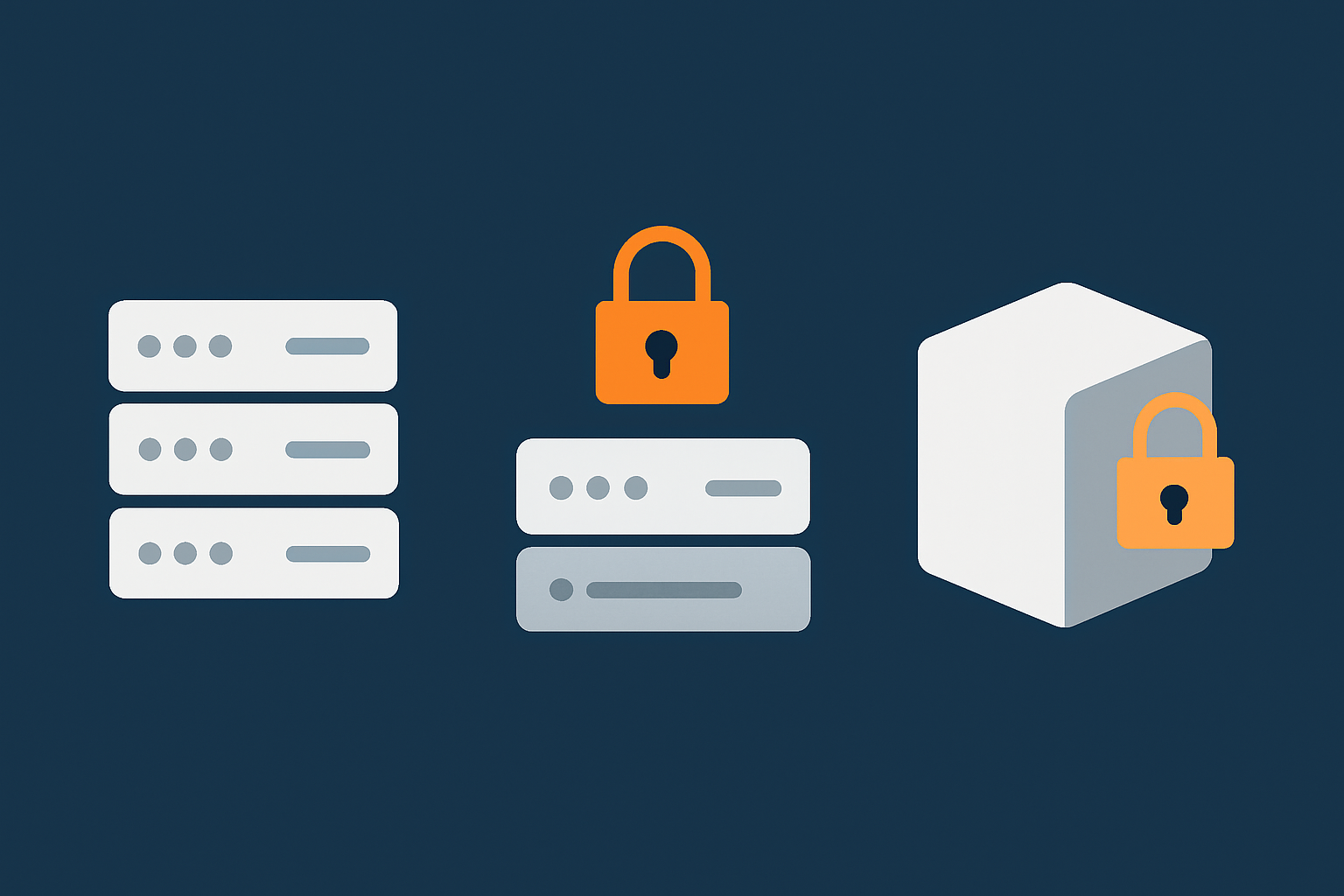
Shared, VPS and virtual dedicated servers from a security perspective
Looking specifically at security:
- Shared hosting is simpler to run and maintain. The provider manages the server, patching and isolation between accounts. This is often appropriate for smaller sites with modest budgets, but you share many components with others, and you have less control over low level hardening.
- VPS hosting gives you control over the operating system and configuration. This enables more customised security, but with that comes responsibility for patching and correct configuration.
- Virtual dedicated servers provide a higher level of isolation, often with dedicated resources and more predictable performance. From a security point of view, they limit cross tenant risks and give you clearer control over both prevention and mitigation policies.
The right choice depends on your technical capacity, risk tolerance and the sensitivity of the data you handle.
Managed vs self managed: who owns which part of prevention and mitigation
There is a second axis to consider: managed vs self managed.
- Self managed You or your team take primary responsibility for server configuration, patching, monitoring and responding to incidents. The provider offers infrastructure and basic platform security.
- Managed The provider handles more of the operational workload: patching, monitoring, first line incident response and often guidance during clean up.
For smaller teams without a full time infrastructure engineer, managed services can reduce the chance of misconfiguration and the stress of incident response. They are particularly helpful where the cost of downtime or data exposure is high compared with the cost of managed support.
Special cases: ecommerce, PCI and handling customer data
Ecommerce and data intensive sites face additional considerations:
- Payment processing may fall under PCI DSS guidelines, even if you use hosted payment pages.
- Customer data is covered by data protection law, so incidents may have regulatory implications.
- Fraud detection and chargeback reduction become part of your broader security picture.
In these scenarios, hosting built with compliance in mind, such as PCI conscious hosting and well designed WooCommerce hosting, can simplify both prevention and mitigation.
What You Should Expect From a Hosting Provider During an Incident
Hosting providers cannot prevent every incident, but they should be a partner in dealing with them.
Typical provider responsibilities vs your responsibilities
While details vary, a reasonable split of responsibilities often looks like this:
- Provider
- Maintains the underlying network, power and hardware.
- Keeps the base hosting platform patched and monitored.
- Provides tools such as firewalls, backups and access controls.
- Assists with containment at the infrastructure level (for example, blocking IPs, disabling compromised accounts, restoring from platform backups).
- You
- Keep your application code, plugins and themes updated.
- Manage user accounts, roles and passwords related to your business.
- Respond to application level compromises and maintain your own security processes.
- Handle customer communication and regulatory obligations.
Managed services can shift some of the application side responsibility back towards the provider, but you always retain ownership of business decisions and communication.
Questions to ask before you sign a contract
Before committing to a hosting provider, it is worth asking:
- What security monitoring is in place at the platform level?
- How and when will we be notified if you detect suspicious activity?
- What support is available during an incident, and during what hours?
- What backup options exist, and who is responsible for initiating restores?
- Can you help with malware clean up, and if so, on what terms?
The goal is clear expectations, rather than assuming that “security is included” in a vague way.
How managed WordPress, WooCommerce and enterprise hosting change the picture
On specialised platforms such as Managed WordPress hosting, WooCommerce hosting or broader enterprise solutions, providers often take on more responsibilities, for example:
- Automatic core and plugin updates with safe rollbacks.
- Proactive malware scanning and blocking of known bad actors.
- Pre configured WAF rules tuned for the specific CMS or ecommerce platform.
- Assisted incident response, especially for production impacting issues.
These services are not a guarantee that nothing will ever happen, but they do reduce both the likelihood and the operational burden when something does occur.
Practical Security Incident Playbook for Small and Mid Sized Teams
You do not need a huge security department to improve your position. A simple, realistic playbook can go a long way.
Simple prevention checklist you can act on this month
Within the next month, aim to:
- Enable 2FA on hosting accounts, CMS admin accounts and key third party services.
- Review all admin users and remove those who no longer need access.
- Update all plugins, themes and the core CMS, starting with security updates.
- Check that your hosting account has working, recent backups and that you know how to restore them.
- Set up basic uptime and security monitoring alerts that go to a shared email inbox or team channel.
These steps alone can significantly reduce exposure to common incidents.
A lightweight incident response plan in 6 steps
A simple, repeatable plan could look like this:
- Detect An alert is received, or someone notices something unusual.
- Confirm One person quickly verifies whether there is likely to be a real issue.
- Contain Put the site into a safer state: maintenance mode, password resets, blocking suspicious traffic.
- Diagnose Identify the likely cause, check logs, consult your hosting provider if needed.
- Remediate and restore Clean up or rebuild, restore from backups if necessary, then validate that the issue is resolved.
- Review and improve Record what happened, update security controls and runbooks.
Write these steps down in a shared document, with names and contact details for who leads each stage.
When to escalate to specialists or move to a different hosting architecture
It may be time to bring in help or consider a different hosting setup if:
- You are seeing repeated incidents of a similar type.
- Incidents involve payment data, sensitive personal information or regulatory reporting.
- Clean ups are consuming significant internal time and energy.
- Your current hosting does not provide the tools or support you need for effective prevention and mitigation.
In those situations, managed hosting or a move to more isolated environments such as virtual dedicated servers can reduce ongoing risk and operational load.
Conclusion: Design for Incidents, So They Are Annoying, Not Existential
Security incidents in web hosting are a reality for almost every organisation at some point. The practical goal is not perfection but resilience.
Balancing spend on prevention and mitigation
Over time, it is usually wise to invest in both:
- Prevention Solid hosting, sensible architecture, good hygiene, patching, traffic filtering.
- Mitigation Monitoring, usable backups, tested restores, clear incident runbooks and communication plans.
The right balance depends on your risk profile and resources. The important thing is to be deliberate in how you allocate effort, rather than assuming one security tool or checkbox covers everything.
Next steps for reviewing your current hosting setup
As a practical follow up, you might:
- Map out your current architecture and list your main dependencies.
- Review who is responsible for each part of prevention and mitigation, both internally and at your hosting provider.
- Identify two or three modest improvements you can implement over the next quarter.
If you would like a second pair of eyes on your current setup, or you are considering managed hosting or virtual dedicated servers to reduce operational risk, G7Cloud can walk through the options with you and help you choose an approach that fits your team and your business.