What Uptime Guarantees Really Mean in Real World Hosting
Introduction: Why Uptime Guarantees Matter More Than the Marketing
“99.99% uptime” looks reassuring on a sales page. It sounds scientific and precise. In reality, it only tells you a small part of the story about how available your website or application will be when people actually need it.
This article looks at uptime guarantees from a business perspective first, and a technical perspective second. The aim is to help you decide what you really need, what you are actually being promised, and what remains your responsibility.
When a few minutes offline is more than a minor annoyance
For some sites, a short outage is an irritation. For others, it is a real business event.
- A local service business may lose a handful of enquiries if their site is down for thirty minutes on a Tuesday.
- A popular WooCommerce store in peak sale season could lose thousands in orders in the same window.
- An internal system such as a booking back office being unavailable can disrupt team workflows, even if customers never see an error page.
The same 30 minutes of downtime has very different impacts depending on:
- When it happens (2am vs 2pm, weekend vs Black Friday)
- Who is affected (public customers vs a small internal team)
- What they are trying to do (read content vs complete payment)
Uptime guarantees are one tool to manage this risk, but they have limits. Understanding those limits is where the value lies.
Why advertised uptime percentages are often misunderstood
There are three common misunderstandings:
- The percentage sounds higher than it really is in minutes. 99.9% uptime still allows more than 40 minutes of downtime per month.
- The scope is unclear. Does it cover only the data centre network, or your individual server, or your database too?
- People mix “uptime” with “everything always works perfectly”. In practice, slow, overloaded or partially broken sites can count as “up” from an SLA point of view.
Before looking at architectures and hosting types, it helps to be clear what uptime actually measures.
Uptime in Plain English: What It Is and What It Is Not
The simple version: “Can customers use the site when they need to?”
In plain terms, uptime answers a simple question:
Can a typical user reach the site and complete their main task during a given period?
If you run a WordPress brochure site, the main task might be “view the home page and contact page”. For a WooCommerce shop, it might be “browse products and complete checkout”. If that main task fails because the server is down, we usually talk about “downtime”.
However, this real world view is broader than most formal uptime guarantees, which are more narrowly defined.
Technical definition: availability over a period of time
From a technical and contractual view, uptime is usually defined as:
Availability = (Total time − Unplanned outage time) ÷ Total time
Key details matter:
- The period: Often a calendar month, occasionally a year.
- Which systems: For example “public network” or “hypervisor” or “virtual machine”.
- What is excluded: Planned maintenance, force majeure events, attacks and customer configuration issues are often carved out.
Standards such as ITIL / service management guidance talk in similar terms: availability is about a defined service being up, as measured at specific points.
Uptime vs performance: slow and broken can be as bad as down
From a customer’s perspective, “spinning forever” or constant 502 errors are no better than a neat 503 “maintenance” page. Yet many uptime SLAs only count hard downtime in their metrics.
In real life you will see issues like:
- The database is limping, so pages take 20 seconds to load.
- A plugin update breaks checkout in WooCommerce but the server responds with HTTP 200 “OK”.
- The home page works, but the admin area or some API endpoints are unreachable.
Your hosting provider might still technically be meeting its uptime guarantee while real customers experience what feels like downtime.
When we talk later about performance tooling and edge networks like the G7 Acceleration Network for caching and bot filtering, it is largely to improve this real world availability, not just the SLA metric.
What 99.9%, 99.95% and 99.99% Uptime Actually Mean in Minutes
Translating percentages into real downtime per month and per year
Percentages hide the scale of real downtime. It helps to convert them into minutes and hours.

Approximate allowed downtime:
| Uptime | Max downtime / month | Max downtime / year |
|---|---|---|
| 99.0% | ~7 hours 18 minutes | ~3 days 15 hours |
| 99.5% | ~3 hours 39 minutes | ~1 day 19 hours |
| 99.9% | ~43 minutes | ~8 hours 45 minutes |
| 99.95% | ~22 minutes | ~4 hours 23 minutes |
| 99.99% | ~4 minutes 23 seconds | ~52 minutes |
Most mid range business hosting sits around 99.9% to 99.95% at the SLA level. Higher numbers become progressively more expensive and complex to achieve in practice.
Examples: the impact on an ecommerce site vs a brochure site
Imagine two sites, both on hosting with a 99.9% uptime SLA:
- Brochure site for a local professional service. 2,000 visitors per month. Each lead is worth roughly £200.
- Growing ecommerce site with WooCommerce. 100,000 visitors per month. Monthly revenue £100,000.
If they lose the full 43 minutes of downtime in a month:
- The brochure site might lose a few contact form submissions. The owner may barely notice unless downtime clusters in peak hours.
- The ecommerce site could lose thousands in abandoned baskets if the outage happens at lunchtime on a weekday or during a promotion.
The percentage is identical, but the business impact is not. This is why it is better to think in terms of “cost of downtime” rather than just chasing higher uptime figures on paper.
Why “five nines” is rarely realistic for normal business hosting
“Five nines” (99.999% uptime) is often mentioned in articles and marketing. It allows about 5 minutes of downtime per year. Achieving that consistently across full application stacks usually requires:
- Redundant infrastructure in multiple data centres
- Automatic failover across regions
- Highly automated deployments and rollbacks
- 24/7 on call teams with clear runbooks
This kind of investment is normal in telecoms and critical financial services. It is usually disproportionate for a standard business website or online shop. For most organisations, aiming for reliable 99.9–99.95% with the right architecture and operational support is more realistic and better value.
What Hosting SLAs Really Cover (and the Small Print You Should Read)
The typical structure of a hosting uptime SLA
Most hosting uptime SLAs follow a similar pattern:
- Definition of “service”: For example, “network connectivity from our data centre border routers to the public internet”.
- Target uptime percentage per month or year.
- Measurement method: Often based on provider monitoring, sometimes with room for customer evidence.
- Service credits: A scale of hosting fee credits when uptime falls below thresholds.
On shared platforms these guarantees typically apply to the underlying infrastructure layer, not individual websites. Higher tiers and Enterprise WordPress hosting with stricter SLAs may include tighter definitions and more direct commitments for specific environments.
Planned maintenance, network vs server, and what is excluded
Most SLAs intentionally exclude some events. Common exclusions include:
- Planned maintenance with prior notice. This may happen out of peak hours, but still technically counts as downtime from a user’s point of view.
- Customer configuration issues. For example, incorrect DNS changes or a broken plugin update.
- Security incidents and denial of service attacks, especially where the provider does not control all upstream elements.
- Third party dependencies such as payment gateways or external APIs.
Read which layer is covered. An SLA for “data centre network” is not the same as one that explicitly covers your virtual server, OS and managed database.
Credits, not compensation: why SLAs do not protect lost revenue
Most uptime SLAs are designed to:
- Encourage the provider to run a reliable platform
- Give you some financial recognition if they fall short
They are usually not designed to compensate for your actual business loss. In practice:
- Credits are often capped at a percentage of your monthly hosting bill.
- They are typically issued as hosting credits, not cash.
- They rarely reflect the value of lost sales or reputational damage.
This is not unique to smaller hosts. Even hyperscale cloud providers structure their SLAs in this way. You should view uptime guarantees as one part of a wider risk management picture, alongside backups, redundancy, incident response and good software practices.
How monitoring and proof of downtime usually works
SLAs nearly always rely on the provider’s monitoring. Some also consider your monitoring data when you raise a ticket.
In practical terms:
- The provider runs checks from one or more locations to test whether a service is reachable.
- Outage windows are recorded when those checks fail consistently for a defined period.
- Planned maintenance windows are logged and usually excluded from SLA calculations.
For your own peace of mind, it helps to run independent monitoring as well. Free or modestly priced services can check your site from multiple regions and alert you when something is wrong. This is increasingly important when you operate more complex architectures with load balancers, CDNs or edge caching, where partial failures may not be obvious.
Common Misconceptions About Uptime Guarantees
“99.9% uptime means my site will almost never be down”
As we have already seen, 99.9% uptime allows over 40 minutes of downtime per month. That downtime may also cluster:
- Several short outages during peak hours can be more painful than one longer one overnight.
- Some SLAs consider only outages longer than a certain threshold, for example 5 or 10 minutes.
Even if your host meets its official uptime target, you can still experience noticeable interruptions to service.
Confusing backups with high availability
Backups and high availability solve different problems:
- Backups help you recover data after something has gone badly wrong.
- High availability architectures reduce downtime in the first place.
Having daily backups of your WordPress database is vital. It does not mean your site will automatically stay online during a server failure. For that you need redundancy, failover and tested recovery procedures.
Assuming shared hosting SLAs behave like enterprise SLAs
On shared hosting, an uptime guarantee often covers:
- The shared platform as a whole
- Network connectivity out of the data centre
They generally do not guarantee:
- That your particular site will never be affected by another user’s resource spike
- That your specific PHP worker pool or database instance will always have instant spare capacity
Enterprise agreements may be more specific and include response time commitments, change control and governance. Expect the associated cost and operational discipline to be higher.
Thinking a CDN alone makes everything highly available
CDNs and edge networks help with resilience, but they are not a magic shield.
- Static assets such as images, CSS and some HTML can be cached at the edge.
- Dynamic, personalised or transactional operations still depend on your origin servers and databases.
The G7 Acceleration Network for caching and bot filtering can significantly improve effective uptime for cached pages by serving them even when the origin is under load, and by blocking abusive traffic before it hits your servers. For carts, checkouts and dashboards, you still need solid backend architecture.
Where Downtime Actually Comes From: Real World Failure Points
Layers of risk: data centre, network, server, software and code
Downtime rarely has a single cause. Think of your hosting as a stack:
- Power and data centre: Power feeds, UPS, cooling, physical security.
- Network: Routers, switches, upstream providers, routing configuration.
- Server hardware / virtualisation platform: Physical hosts, storage arrays, hypervisors.
- Operating system and platform services: Linux, web server, database, caching layers.
- Application and code: WordPress core, themes, plugins, custom code, integrations.
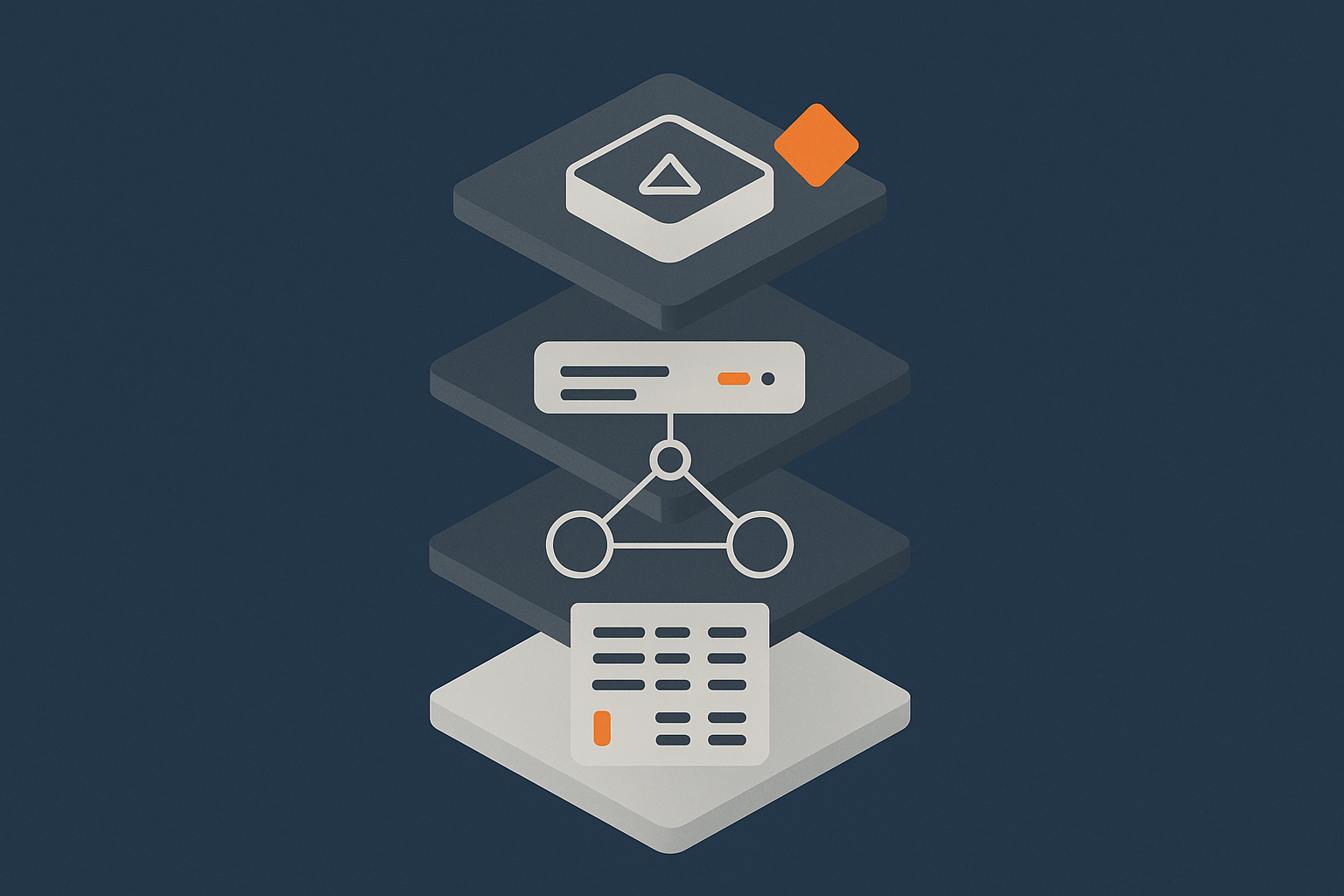
Problems at any layer can lead to perceived downtime. For a more detailed breakdown of these layers, see Why Websites Go Down: The Most Common Hosting Failure Points.
Application and WordPress issues that look like hosting downtime
Many “hosting outages” are actually application problems, for example:
- A plugin update causing PHP errors across the site
- A misconfigured caching plugin creating redirect loops
- Code that exhausts memory or runs extremely slow queries
From a visitor’s perspective, the site appears broken or unavailable. From the host’s perspective, the server is running and reachable, so they may not count it against their uptime guarantee.
This gap in responsibility is one reason many businesses move to Managed WordPress hosting for business critical sites, where the provider takes on more responsibility for the application environment and common failure patterns.
Traffic spikes, bad bots and resource exhaustion
Another frequent cause of downtime is simple overload:
- A marketing campaign drives traffic beyond normal capacity.
- Bad bots or scraping tools hammer the site with unnecessary requests.
- A database query or search function scales poorly with load.
In these scenarios, your servers may still be technically “up” but too busy to respond promptly. Effective caching, rate limiting, and networks such as the G7 Acceleration Network for caching and bot filtering can dramatically reduce the load that actually reaches your application, helping real uptime match the SLA figure.
How Different Hosting Models Affect Real Uptime
Shared hosting: noisy neighbours and limited control
Shared hosting is like a flat in a busy block. You have your own space, but share walls, utilities and sometimes noise with other tenants.
Typical characteristics:
- Lower cost, suitable for small sites with modest traffic.
- Resource sharing. Spikes from one site can affect others.
- Limited control over tuning and stack configuration.
You may see a strong uptime SLA for the platform, but your particular site can still slow down or stall during busy periods. For genuinely critical sites, this may not be the right foundation. The article Shared, VPS or Dedicated Hosting: How to Choose the Right Foundation for Your Business goes deeper into these trade offs.
VPS and virtual dedicated servers: isolation and predictable resources
With a VPS or Virtual dedicated servers for predictable resources and isolation, you still share physical hardware but you have guaranteed slices of CPU, RAM and storage.
Benefits for uptime include:
- Less impact from “noisy neighbours”
- More control over software versions and configuration
- Predictable performance as you scale
The trade off is that you or your provider must manage more of the stack: OS patches, monitoring, security hardening and capacity planning.
Managed WordPress / WooCommerce: platform reliability and operational support
Managed platforms wrap the underlying hosting in operational support. Typical features include:
- Stack tuned specifically for WordPress or WooCommerce
- Monitored updates, backups and security controls
- Support that understands common WordPress failure patterns
This can significantly improve real uptime by reducing avoidable issues from plugin conflicts, poor configuration and slow queries. If your site directly generates revenue, options like WooCommerce hosting for high intent ecommerce traffic are worth considering, not because shared hosting is inherently “bad”, but because operational mistakes become more costly as you grow.
Enterprise and PCI conscious setups: SLAs, governance and risk reduction
At the higher end, environments with strict uptime expectations often involve:
- Redundant components at multiple layers
- Formal change control and release processes
- Documented RTO/RPO (recovery time / recovery point objectives)
- Additional security and compliance requirements
For workloads handling payments or sensitive data, PCI conscious hosting for payment and compliance sensitive workloads and similar architectures combine availability, security and governance. They demand more investment and usually sit alongside clear internal responsibilities for incident management and on call cover.
Architecture Choices That Matter More Than the Percentage on the Sales Page
Redundancy vs single points of failure
A single highly available server is still a single point of failure. True resilience comes from redundancy:
- Multiple web servers instead of one
- Database replicas or managed clustered databases
- Dual power feeds and network paths in the data centre
Each step adds cost and complexity, but also removes a possible single failure that could take you entirely offline.
Load balancing, failover and active/passive designs in simple terms
A few basic patterns:
- Load balancing: Traffic is spread across multiple servers. If one fails, the others continue to serve users.
- Active/passive: One primary system handles traffic; a secondary system stands by and takes over if the primary fails.
- Multi site / multi region: Entire environments are duplicated in different locations with DNS or traffic managers shifting users during failures.
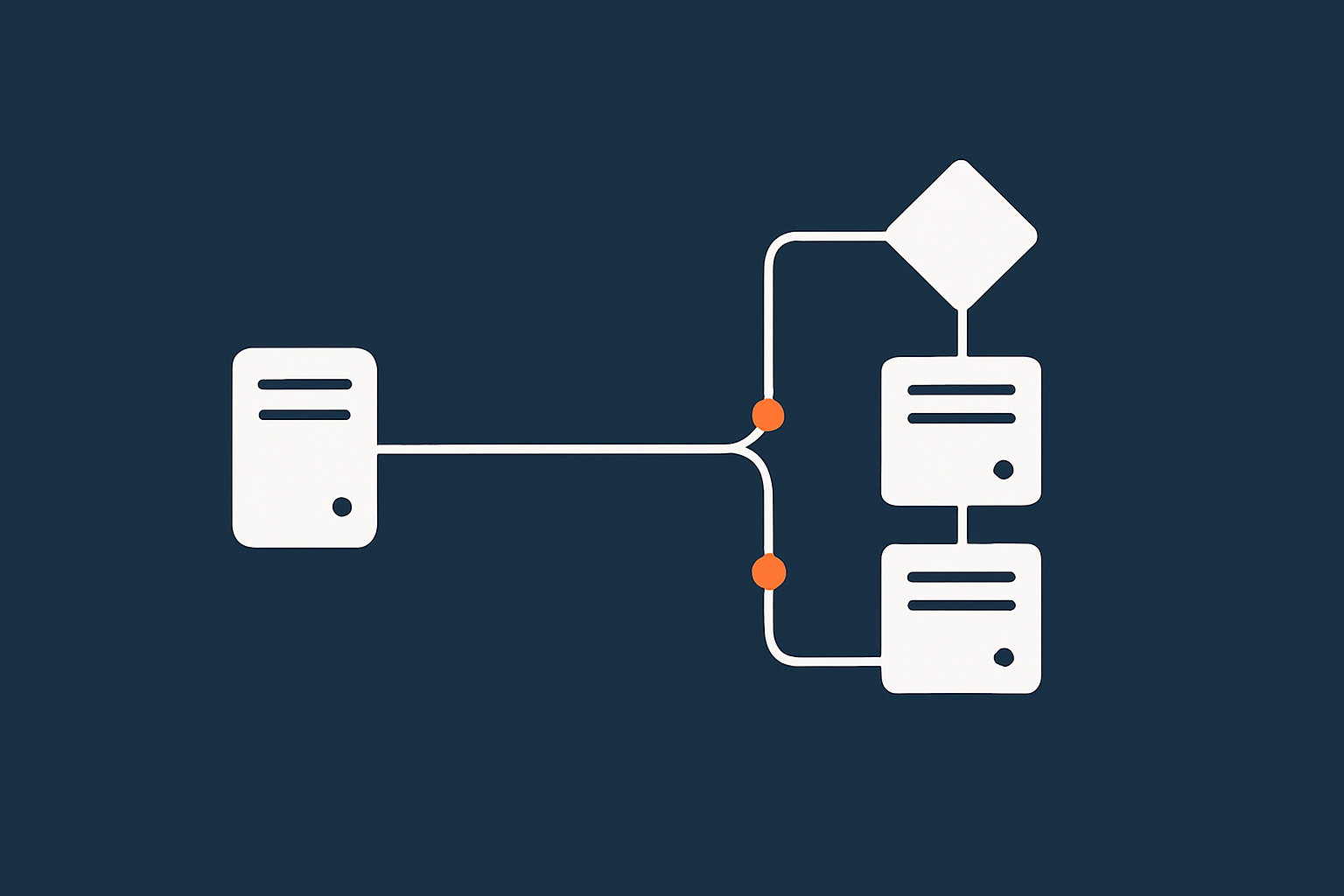
The right pattern depends on your risk tolerance and budget. For many SMEs, moving from a single server to a modest load balanced pair is a sensible middle ground.
How caching, CDNs and edge networks improve perceived uptime
Good caching strategies can keep more of your site responsive even when the origin is under pressure:
- Page caching reduces repeated work for common pages.
- Object and database caching reduce load on slower parts of the stack.
- CDNs and edge networks cache content closer to users and can serve it even if the origin is briefly unreachable.
The Web hosting performance features that improve perceived uptime on platforms like G7Cloud, and specifically the G7 Acceleration Network, combine caching with on the fly image optimisation into AVIF and WebP. This not only speeds up delivery and improves global reach, but also reduces the strain on your origin servers, helping them stay available under load.
Monitoring, alerting and response: who wakes up at 2am?
Even the best architecture needs people or processes to respond to incidents.
Key questions are:
- Who receives alerts when there is a problem?
- Who has access and authority to restart services, scale resources or roll back releases?
- Is there someone on call out of hours, or is that covered by a managed service?
For many smaller internal teams, maintaining 24/7 readiness is challenging. In those cases, managed hosting, managed VDS or enterprise services can sensibly shift some of that operational burden to the provider, as long as responsibilities are clearly defined.
Choosing the Right Uptime Target for Your Business
Step 1: Work out what downtime really costs you
Start with business metrics, not technical aspirations. Consider:
- Average revenue per hour during different times of day and week
- Cost of staff idle time if internal systems are unavailable
- Reputational impact if a public site fails during key events
Even simple back of the envelope calculations can clarify whether it is worth paying for a more resilient architecture or managed service.
Step 2: Map business critical journeys to technical components
List the key user journeys, such as:
- “Visitor completes contact form”
- “Customer checks out an order”
- “Staff update products in the CMS”
Then map each to the underlying components: domain, DNS, CDN, web servers, databases, payment gateways and so on. This helps identify genuine single points of failure and where investment would have the biggest impact.
Step 3: Match hosting tier and SLA to your real risk tolerance
Once you understand impact and dependencies, you can decide where you fit broadly:
- Lower criticality: Basic uptime SLA, simple architecture, backups and monitoring may be enough.
- Medium criticality: VPS or virtual dedicated servers, managed platform, some redundancy and performance optimisation.
- High criticality: Multi server architectures, stricter SLAs, robust processes and perhaps multi site deployments.
The aim is not to chase the highest percentage figure, but to reach a sensible balance between cost, complexity and risk.
Examples: local service business, growing ecommerce, and high volume enterprise
To make this more concrete:
- Local service business: WordPress brochure site, 2–3 leads per day. A reliable shared or modest VPS plan with daily backups and basic monitoring may be entirely sufficient.
- Growing ecommerce site: WooCommerce, active marketing, peaks around campaigns. A managed WordPress / WooCommerce platform on a virtual dedicated server with caching, edge acceleration and some redundancy is often a good fit.
- High volume enterprise: Multiple revenue streams, strict SLAs, regulatory requirements. A custom enterprise architecture with geographically redundant components, PCI conscious elements where needed, and a formal on call and incident process is usually appropriate.
Questions to Ask a Hosting Provider About Uptime (Beyond the Marketing Line)
Clarifying monitoring, maintenance windows and escalation
Useful questions include:
- What exactly do you monitor, and from where?
- When do you schedule maintenance, and how much notice do you give?
- What is your escalation path during an incident, and how can we reach you?
- Do you offer different response time commitments at different service levels?
This gives you a feel for how incidents are actually managed, which matters as much as the uptime figure itself.
Understanding what is redundant and what is not
Ask which components are single instance and which are redundant:
- Are web servers clustered or single?
- Is the database replicated or does it have a single primary only?
- Is storage local to a host or on redundant shared storage?
- What happens if a physical host fails?
Understanding these trade offs lets you make conscious decisions rather than relying on high level marketing terms like “high availability”.
How they handle DDoS, abusive bots and unexpected traffic
Modern downtime often comes from traffic patterns rather than hardware failures. Clarify:
- Do you provide DDoS mitigation at the network edge?
- How do you handle aggressive bots and scrapers?
- Can the platform scale up or out quickly if we run a major campaign?
Edge networks such as the G7 Acceleration Network for caching and bot filtering can make a real difference here by reducing both malicious and unnecessary load on the origin.
What “managed” actually covers in day-to-day incidents
“Managed” is a broad term, so it is worth asking:
- Do you proactively apply OS and platform security updates?
- Do you help diagnose performance issues at the application level?
- Will you roll back a problematic plugin or theme update if it breaks the site?
- Who owns responsibility for backups and recovery testing?
A clear division of responsibilities avoids unpleasant surprises in the middle of an incident.
Pulling It All Together: A Practical Checklist
Simple checklist for evaluating uptime promises and risk
When reviewing a hosting option, you can quickly run through:
- What is the stated uptime target, and over what period?
- Which parts of the stack are covered by the SLA?
- What is excluded: maintenance, attacks, third party services?
- What service credits apply, and how are they claimed?
- Which components are redundant, and which are single points of failure?
- What monitoring and alerting exists on both the provider and customer side?
- Who responds to incidents, and what is their typical response time?
When to stay simple and when to consider a higher tier or new architecture
You might decide to:
- Stay simple if downtime impact is low and you are comfortable with occasional short outages, as long as backups and monitoring are sound.
- Move up a tier to a VPS, virtual dedicated server or managed platform when your site starts earning significant revenue or powering operational workflows.
- Redesign the architecture with load balancing, redundancy and stricter SLAs when outages become genuinely business critical events.
If you want more background on diagnosing performance versus true downtime, How to Diagnose Slow WordPress Performance Using Real Tools and Metrics is a useful companion piece.
Where to Go Next
Exploring hosting options as your uptime needs increase
As your requirements grow, it is often worth talking through options rather than trying to piece together an architecture from marketing material alone. Managed hosting and Virtual dedicated servers for predictable resources and isolation can reduce operational risk for in house teams that do not want to run 24/7 infrastructure themselves.
If you would like to discuss what level of uptime, redundancy and management actually fits your situation, you are very welcome to speak with G7Cloud about your current setup and future plans.
Further reading on common causes of downtime and performance issues
For deeper dives into related topics:
- Why Websites Go Down: The Most Common Hosting Failure Points
- A No Nonsense Guide to Choosing a CDN and Image Optimisation for WordPress
If you prefer more formal background on availability concepts, the USENIX writing on availability and failure modes is a good technical complement to this more business focused guide.